Hey guys,
I hope I’ve put this in the right category! I’m trying to assign my fungal ITS taxa functional guilds with FUNGuild, but to do so I need an OTU able formatted a specific way. I’ve managed to use ITSxpress to extract the ITS1 region, called sequence variants with DADA2, visualised my results, and then clustered my ASVs to 99% OTUs. I assigned taxonomy to the OTUs using a pre-trained Naive Bayes classifier trained on the UNITE database (v.10) with a 99% similarity threshold, which I could then visualise with barplots. I merged the OTU table with the taxonomy by exporting both, converting the .biom files to .tsv files, and then adding the taxonomy column to the OTU table using nano. The resulting .tsv file looks like this:
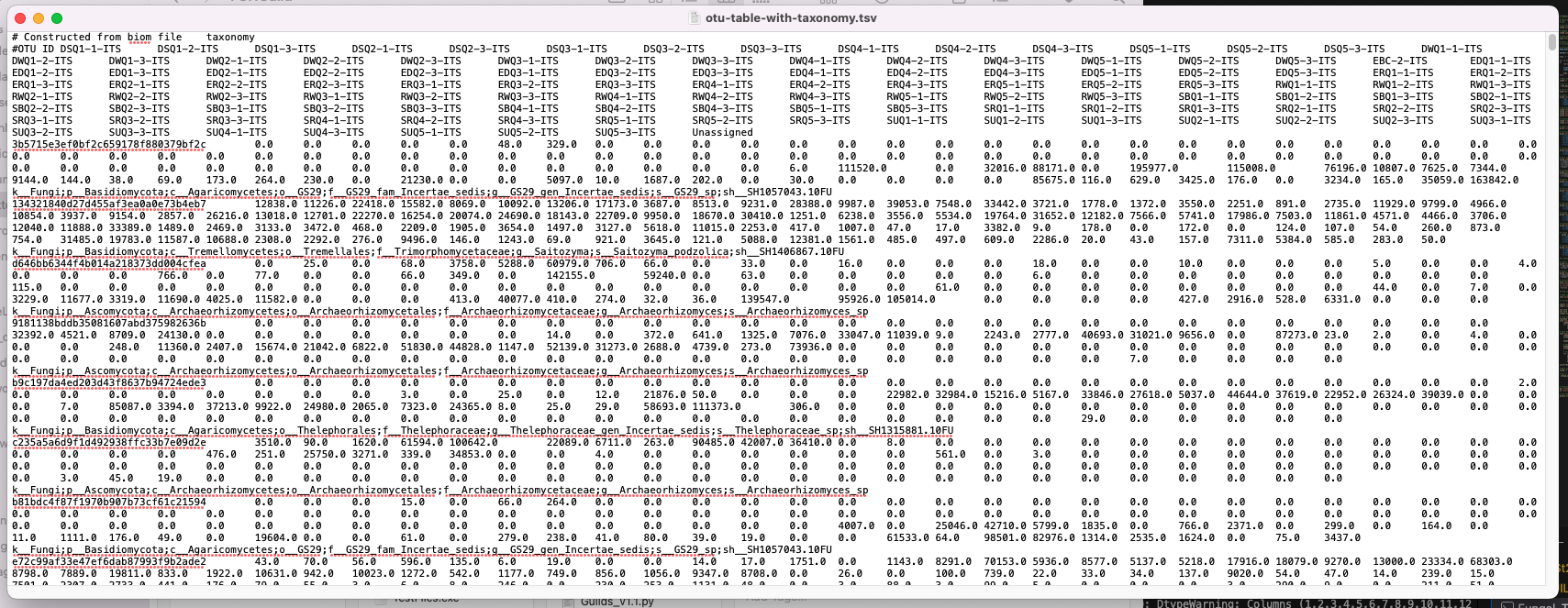
However, the example OTU table given to demonstrate the format required for FUNGuild looks like this:
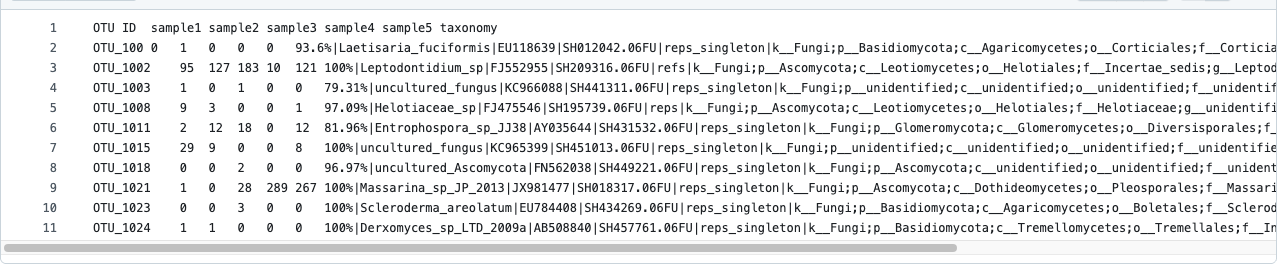
I was wondering if there was a way to change the OTU IDs so that they’re numbered more simply (unlike the long reads in mine), a way to get rid of the first line (“# Constructed from biom file”), and a way to get rid of the # in front of the “#OTU ID” column name. Mine also appears to be a bit more chaotic but I think this is just because of the length of the OTU ID sequences?
Anyway, I think these barriers are stopping FUNGuild from running properly – I don’t think it can recognise the columns unless the formatting is exactly the same. I also thought that it might work better if I could run FUNGuild on genus-level assignments rather than species-level, but I’m not sure if there’s a way to drop species-level assignments easily in this table, so it just shows genus-level assignments and above?
I’ve been following the moving pictures tutorial here, this thread here for the ITSxpress parts, and this here for the pre-trained classifier. This is the FUNGuild github page for reference here too.
This is my code:
# Import raw reads & turn into artifact

qiime tools import \\
--type 'SampleData\[PairedEndSequencesWithQuality\]' \\
--input-path ITS-manifest.tsv \\
--output-path its-demux.qza \\
--input-format PairedEndFastqManifestPhred33V2

# Download ITSxpress as QIIME2 plugin
conda env create -n qiime2-amplicon-2025.10 --file https://data.qiime2.org/distro/amplicon/qiime2-amplicon-2025.10-py310-osx-conda.yml

conda activate qiime2-amplicon-2025.10

conda install -c bioconda -c conda-forge ITSxpress

qiime dev refresh-cache

# Installing ITSxpress for standalone use

conda create -n itsxpressenv -c bioconda -c conda-forge itsxpress

conda activate itsxpressenv

# Check to see ITSxpress plugin is installed

qiime itsxpress

# Extract ITS1 region with ITSxpress

qiime itsxpress trim-pair-output-unmerged \\
--i-per-sample-sequences its-demux.qza \\
--p-region ITS1 \\
--p-taxa F \\
--p-cluster-id 1.0 \\
--p-threads 8 \\
--o-trimmed its1-trimmed.qza

# Visualise quality of trimmed ITS1 reads

qiime demux summarize \\
--i-data its1-trimmed.qza \\
--o-visualization its1-trimmed.qzv

# Call sequence variants with DADA2

qiime dada2 denoise-paired \\
--i-demultiplexed-seqs its1-trimmed.qza \\
--p-trunc-len-r 0 \\
--p-trunc-len-f 0 \\
--output-dir dada2out

# Visualise results

qiime metadata tabulate \\
--m-input-file denoising_stats.qza \\
--o-visualization denoising_stats.qzv

# Export DADA2 table

qiime tools export \\
--input-path its-dada2-table.qza \\
--output-path exported-table

# Cluster to 99% OTUs

qiime vsearch cluster-features-de-novo \\
--i-sequences its-dada2-repseqs.qza \\
--i-table its-dada2-table.qza \\
--p-perc-identity 0.99 \\
--o-clustered-table its-otu-table.qza \\
--o-clustered-sequences its-otu-repseqs.qza

# Tabulate

qiime metadata tabulate \\
--m-input-file its-otu-table.qza \\
--o-visualization its-otu-table.qzv

# Assign taxonomy to OTUs using UNITE pre-trained classifier

qiime feature-classifier classify-sklearn \\
--i-classifier unite_ver10_99_s_19.02.2025-Q2-2024.10.qza \\
--i-reads its-otu-repseqs.qza \\
--o-classification its-taxonomy.qza

# Tabulate taxonomy

qiime metadata tabulate \\
--m-input-file its-taxonomy.qza \\
--o-visualization its-taxonomy.qzv

# Create barplot for visualisation

qiime taxa barplot \\
--i-table its-otu-table.qza \\
--i-taxonomy its-taxonomy.qza \\
--m-metadata-file metadata_ITS.tsv \\
--o-visualization taxa-bar-plots.qzv

# Tabulate OTU table with taxonomy

qiime metadata tabulate \\
--m-input-file its-otu-table.qza \\
--m-input-file its-taxonomy.qza \\
--m-metadata-file metadata_ITS \\
--o-visualization its-otu-table-with-tax.qzv

## Create merged taxonomy + OTU table

# Export OTU table

qiime tools export \\
--input-path its-otu-table.qza \\
--output-path its-otu-table

# Export taxonomy

qiime tools export \\
--input-path its-taxonomy.qza \\
--output-path its-taxonomy

# Convert biom to tsv

biom convert \\
-i its-otu-table/feature-table.biom \\
-o its-otu-table.tsv \\
--to-tsv

## Add taxonomy to tsv

# Make nano file

nano merge_otu_taxonomy.py

#!/usr/bin/env python3

import csv

import sys

otu_file = "its-otu-table.tsv"

tax_file = "taxonomy.tsv"

output_file = "otu-table-with-taxonomy.tsv"

# Load taxonomy

taxonomy = {}

with open(tax_file, "r") as t:

reader = csv.DictReader(t, delimiter="\\t")

for row in reader:

feature = row\["Feature ID"\]

taxonomy\[feature\] = row\["Taxon"\]

# Open OTU table

with open(otu_file, "r") as f, open(output_file, "w") as out:

reader = csv.reader(f, delimiter="\\t")

writer = csv.writer(out, delimiter="\\t")

header = next(reader)

# Add taxonomy column

header.append("taxonomy")

writer.writerow(header)

# For each OTU

for row in reader:

otu_id = row\[0\]

tax = taxonomy.get(otu_id, "Unassigned")

row.append(tax)

writer.writerow(row)

print("Done! Output written to:", output_file)

# Make executable

chmod +x merge_otu_taxonomy.py

# Run it

./merge_otu_taxonomy.py

# Prepare workspace and set directory for FUNGuild

git clone https://github.com/UMNFuN/FUNGuild

cd /Users/lowelabshared/Desktop/Madi/Madi_Data_AGRF-selected/AGRF_DVPROCAGRF25060388-2_AAHFYLYM5-ITS-Fungi/FUNGuild

# Run the script with default parameters

python Guilds_v1.1.py -otu /Users/lowelabshared/Desktop/Madi/Madi_Data_AGRF-selected/AGRF_DVPROCAGRF25060388-2_AAHFYLYM5-ITS-Fungi/FUNGuild/otu-table-with-taxonomy.tsv -db fungi
Any and all help appreciated! Thank you 
I’m brand new to all of this so I apologise if I didn’t make sense or if these are really silly questions.
Cheers
