# Python Tutorial: Data Visualization with Dokdo API
**URL:** https://forum.qiime2.org/t/python-tutorial-data-visualization-with-dokdo-api/17380
**Category:** Tutorials
**Tags:** tutorial
**Created:** [November 9, 2020, 5:45am UTC](https://forum.qiime2.org/t/python-tutorial-data-visualization-with-dokdo-api/17380 "2020-11-09T05:45:19Z")
**Posts on this page:** 20
**Page:** 1
### Author:  [@sbslee](https://forum.qiime2.org/u/sbslee)
#### Post date: [November 9, 2020, 5:45am UTC](https://forum.qiime2.org/t/python-tutorial-data-visualization-with-dokdo-api/17380/1 "2020-11-09T05:45:19Z")
This tutorial has gotten so big that apparently the text body exceeded the maximum number of characters one can enter in a post (99,000)! Therefore, I will leave a [link](https://dokdo.readthedocs.io/en/latest/dokdo_api.html) to Dokdo API for those who are interested in seeing the most up-to-date tutorial. Please let me know if you have any questions.
> **Click here to see the original documentation**
>
> Hi everyone,
>
> My name is Seung-been Lee, and I go by Steven. I'm currently a senior researcher at a next-generation sequencing company in South Korea. I started doing microbiome analysis only this September. If it wasn’t for QIIME 2, I would not have been able to pick up my projects so quickly and smoothly. Therefore, I am very grateful for the QIIME 2 team for their amazing work and user support, as well as the QIIME 2 community for their kind and helpful discussions.
>
> That being said, one main task I have to constantly do for my microbiome project is creating publication-quality figures. QIIME 2 already provides [Visualizations](https://docs.qiime2.org/2020.8/concepts/#data-files-visualizations) and [QIIME 2 View](https://view.qiime2.org/), both of which are extremely useful for exploring the output data interactively. However, I noticed that these options are not robust enough for me when it comes to making figures for presentation (e.g. PowerPoint). For example, you cannot currently download alpha rarefaction curve from the [alpha-rarefaction.qzv](https://view.qiime2.org/visualization/?type=html&src=https%3A%2F%2Fdocs.qiime2.org%2F2020.6%2Fdata%2Ftutorials%2Fmoving-pictures%2Falpha-rarefaction.qzv) file. For other Visualizations, you can download the figure as a PNG/SVG file, but you cannot change its axis, legend, title, etc. Moreover, once created, those visualization files cannot be modified to, for example, make a subset of the samples (e.g. a [taxonomic bar plot](https://view.qiime2.org/visualization/?type=html&src=https%3A%2F%2Fdocs.qiime2.org%2F2020.6%2Fdata%2Ftutorials%2Fmoving-pictures%2Ftaxa-bar-plots.qzv)). Therefore, the user would have to go way back to perform sample filtration, redo the analysis, and create a new visualization file again, which can be burdensome and time-consuming.
>
> **At this point, let me be very clear: I'm not saying QIIME 2 Visualizations should be able to do all the things I metnioned above.** I would say it's actually better QIIME 2 doesn't do those because then its code can stay simple and focused on the method's core functionality. And the QIIME 2 user can employ other tools to make the plots however they want. For example, if you are coming from the world of R software, you already have the famous tools available such as [Phyloseq](https://joey711.github.io/phyloseq/#:~:text=The%20phyloseq%20package%20is%20a,taxonomic%20assignment%20of%20the%20OTUs.) and [qiime2R](https://github.com/jbisanz/qiime2R).
>
> The issue for me was, even though I can code in both Python and R, I’m way more proficient in Python, and I could not find any Python packages for plotting QIIME 2 objects/files efficiently. That is why I wrote the [Dokdo](https://github.com/sbslee/dokdo) package myself. **Dokdo is a lightweight Python package for microbiome sequencing analysis, which can be used as a command line tool and as a Python module. Dokdo is designed to be used with QIIME 2.**
>
> For the purpose of this tutorial, I will only describe the Dokdo API and how it can be used to make pretty figures using QIIME 2 files/objects directly. For more details, please visit the Dokdo [repository](https://github.com/sbslee/dokdo) and its [Wiki page](https://github.com/sbslee/dokdo/wiki). Note also that this tutorial was inspired by the famous [qiime2R tutorial](https://forum.qiime2.org/t/tutorial-integrating-qiime2-and-r-for-data-visualization-and-analysis-using-qiime2r/4121) by Jordan Bisanz.
>
> If you have any questions/suggestions/feature requests/etc., please let me know in the comment section.
>
> **Important note: This page assumes you are using the latest Dokdo version 1.5.0. If you are using an older version, please consider updating.**
>
> # Table of Contents
>
> - [Introduction](#Introduction)
> - [Tips](#Tips)
> - [Setting Figure Properties](#Setting-Figure-Properties)
> - [Aesthetics](#Aesthetics)
> - [Plot Size](#Plot-Size)
> - [Title, Axis, Legend, Font Size](#_artist)
>
> - [Plotting Legend Separately](#Plotting-Legend-Separately)
> - [Plotting QIIME 2 Files vs. Objects](#Plotting-QIIME-2-Files-vs-Objects)
>
> - [General Methods](#General-Methods)
> - [get\_mf](#get_mf)
> - [ordinate](#ordinate)
>
> - [Main Plotting Methods](#Main-Plotting-Methods)
> - [read\_quality\_plot](#read_quality_plot)
> - [denoising\_stats\_plot](#denoising_stats_plot)
> - [alpha\_rarefaction\_plot](#alpha_rarefaction_plot)
> - [alpha\_diversity\_plot](#alpha_diversity_plot)
> - [beta\_2d\_plot](#beta_2d_plot)
> - [beta\_3d\_plot](#beta_3d_plot)
> - [beta\_scree\_plot](#beta_scree_plot)
> - [beta\_parallel\_plot](#beta_parallel_plot)
> - [distance\_matrix\_plot](#distance_matrix_plot)
> - [taxa\_abundance\_bar\_plot](#taxa_abundance_bar_plot)
> - [taxa\_abundance\_box\_plot](#taxa_abundance_box_plot)
> - [ancom\_volcano\_plot](#ancom_volcano_plot)
>
> - [Other Plotting Methods](#Other-Plotting-Methods)
> - [addsig](#addsig)
> - [addpairs](#addpairs)
> - [addbiplot](#addbiplot)
> - [barplot](#barplot)
> - [heatmap](#heatmap)
> - [regplot](#regplot)
>
> # Introduction
>
> This page describes the Dokdo API, which is designed to be used with Jupyter Notebook in Python. Before using the Dokdo API, please make sure your notebook is open within an environment where QIIME 2 and Dokdo are already installed.
>
> First, at the beginning of your notebook, enter the following to import the Dokdo API.
>
> ```auto
> import dokdo
>
> ```
>
> Next, add the following to make figures. You should have the `matplotlib` package already installed in your environment because it is included in QIIME 2 installation. With the magic function `%matplotlib inline`, the output of plotting methods will be displayed inline within Jupyter Notebook.
>
> ```auto
> import matplotlib.pyplot as plt
> %matplotlib inline
>
> ```
>
> Finally, set the seed so that our results are reproducible.
>
> ```auto
> import numpy as np
> np.random.seed(1)
>
> ```
>
> # Tips
>
> ## Setting Figure Properties
>
> In this section, you'll learn how to control various properties of a figure using the plotting method `denoising_stats_plot` as an example. This method creates a grouped box chart using denoising statistics from the DADA 2 algorithm. For more details about the method, see the [denoising\_stats\_plot](#denoising_stats_plot) section.
>
> Let's start with a toy example. The figure below does not have a legend, which is bad, but let's not worry about that now.
>
> ```auto
> qza_file = 'data/atacama-soil-microbiome-tutorial/denoising-stats.qza'
> metadata_file = 'data/atacama-soil-microbiome-tutorial/sample-metadata.tsv'
> where = 'transect-name'
>
> args = [qza_file, metadata_file, where]
>
> dokdo.denoising_stats_plot(*args)
>
> plt.tight_layout()
> plt.savefig('images/Dokdo-API/Setting-Figure-Properties-1C.png')
>
> ```
>
> 
>
> ### Aesthetics
>
> The first thing we can do is changing the figure style. I personally like the `seaborn` package's default style.
>
> ```auto
> import seaborn as sns
>
> with sns.axes_style('darkgrid'):
> dokdo.denoising_stats_plot(*args)
>
> plt.tight_layout()
> plt.savefig('images/Dokdo-API/Setting-Figure-Properties-2C.png')
>
> ```
>
> 
>
> If you're coming from the world of R software, you may find the `ggplot` style more soothing for your eyes.
>
> ```auto
> import matplotlib.pyplot as plt
>
> with plt.style.context('ggplot'):
> dokdo.denoising_stats_plot(*args)
>
> plt.tight_layout()
> plt.savefig('images/Dokdo-API/Setting-Figure-Properties-3C.png')
>
> ```
>
> 
>
> Note that in both cases, the styling is set locally. If you plan to make many plots and want to set the style for all of them (i.e. globally), use the following.
>
> ```auto
> import seaborn as sns
> sns.set()
> # import matplotlib.pyplot as plt
> # plt.style.use('ggplot')
>
> ```
>
> Finally, you can turn off the styling at any point after setting it globally with the following.
>
> ```auto
> # import matplotlib
> # matplotlib.rc_file_defaults()
>
> ```
>
> ### Plot Size
>
> There are various ways you can control the figure size. The easiest way is to use the `figsize` argument in a plotting method call, as shown below.
>
> ```auto
> dokdo.denoising_stats_plot(*args, figsize=(9, 3))
>
> plt.tight_layout()
> plt.savefig('images/Dokdo-API/Setting-Figure-Properties-4C.png')
>
> ```
>
> 
>
> If you plan to draw more than one plot in the same figure (i.e. multiple "subplots"), you can specify size for the entire figure in the following way.
>
> ```auto
> fig, [ax1, ax2] = plt.subplots(1, 2, figsize=(9, 3))
>
> dokdo.denoising_stats_plot(*args, ax=ax1)
> dokdo.denoising_stats_plot(*args, ax=ax2)
>
> plt.tight_layout()
> plt.savefig('images/Dokdo-API/Setting-Figure-Properties-5C.png')
>
> ```
>
> 
>
> You can also set the width and/or height of individual subplots using `width_ratios` and `height_ratios` from `gridspec_kw`.
>
> ```auto
> fig, [ax1, ax2] = plt.subplots(1, 2, figsize=(9, 3), gridspec_kw={'width_ratios': [8, 2]})
>
> dokdo.denoising_stats_plot(*args, ax=ax1)
> dokdo.denoising_stats_plot(*args, ax=ax2)
>
> plt.tight_layout()
> plt.savefig('images/Dokdo-API/Setting-Figure-Properties-6C.png')
>
> ```
>
> 
>
> Alternatively, you can combine empty subplots to create a bigger subplot using `gridspec`.
>
> ```auto
> import matplotlib.gridspec as gridspec
>
> fig, axes = plt.subplots(2, 2, figsize=(9, 5))
>
> dokdo.denoising_stats_plot(*args, ax=axes[0][0])
> dokdo.denoising_stats_plot(*args, ax=axes[1][0])
>
> gs = axes[0, 1].get_gridspec()
>
> for ax in axes[0:2, 1]:
> ax.remove()
>
> axbig = fig.add_subplot(gs[0:2, 1])
> dokdo.denoising_stats_plot(*args, ax=axbig)
>
> plt.tight_layout()
> plt.savefig('images/Dokdo-API/Setting-Figure-Properties-7C.png')
>
> ```
>
> 
>
> ### Title, Axis, Legend, Font Size
>
> Each main plotting method takes a dictionary argument called `artist_kwargs` as input that is passed down to the private method `_artist` as shown below. For example, the `show_legend` argument defined in `_artist` is set as `False` by default, which means if you want to include the figure legend, you should include `artist_kwargs=dict(show_legend=True)` in your method call.
>
> Note that internally, different plotting methods use a different set of default keyword arguments for `_artist`. For example, by default, the `denoising_stats_plot` method passes `ylabel='Read depth'` to `_artist` whereas the `taxa_abundance_bar_plot` method passes `ylabel='Relative abundance (%)'`. Of course, you can always easily change the y-axis label with `artist_kwargs=dict(ylabel='My new y-axis label')`
>
> ```auto
> Help on function _artist in module dokdo.api:
>
> _artist(ax, title=None, title_fontsize=None, xlabel=None, xlabel_fontsize=None, ylabel=None, ylabel_fontsize=None, zlabel=None, zlabel_fontsize=None, xticks=None, yticks=None, xticklabels=None, xticklabels_fontsize=None, yticklabels=None, yticklabels_fontsize=None, xrot=None, xha=None, xmin=None, xmax=None, ymin=None, ymax=None, xlog=False, ylog=False, hide_xtexts=False, hide_ytexts=False, hide_ztexts=False, hide_xlabel=False, hide_ylabel=False, hide_zlabel=False, hide_xticks=False, hide_yticks=False, hide_zticks=False, hide_xticklabels=False, hide_yticklabels=False, hide_zticklabels=False, show_legend=False, legend_loc='best', legend_ncol=1, legend_labels=None, legend_short=False, remove_duplicates=False, legend_only=False, legend_fontsize=None, legend_markerscale=None, legend_lw=None, legend_title=None, plot_method=None)
> This method controls various properties of a figure.
>
> Parameters
> ----------
> ax : matplotlib.axes.Axes
> Axes object to draw the plot onto.
> title : str, optional
> Sets the figure title.
> title_fontsize : float or str, optional
> Sets the title font size.
> xlabel : str, optional
> Set the x-axis label.
> xlabel_fontsize : float or str, optional
> Sets the x-axis label font size.
> ylabel : str, optional
> Set the y-axis label.
> ylabel_fontsize : float or str, optional
> Sets the y-axis label font size.
> zlabel : str, optional
> Set the z-axis label.
> zlabel_fontsize : float or str, optional
> Sets the z-axis label font size.
> xticks : list, optional
> Positions of x-axis ticks.
> yticks : list, optional
> Positions of y-axis ticks.
> xticklabels : list, optional
> Tick labels for the x-axis.
> xticklabels_fontsize : float or str, optional
> Font size for the x-axis tick labels.
> yticklabels : list, optional
> Tick labels for the y-axis.
> yticklabels_fontsize : float or str, optional
> Font size for the y-axis tick labels.
> xrot : float, optional
> Rotation degree of tick labels for the x-axis.
> xha : str, optional
> Horizontal alignment of tick labels for the x-axis.
> xmin : float, optional
> Minimum value for the x-axis.
> xmax : float, optional
> Maximum value for the x-axis.
> ymin : float, optional
> Minimum value for the y-axis.
> ymax : float, optional
> Maximum value for the x-axis.
> xlog : bool, default: False
> Draw the x-axis in log scale.
> ylog : bool, default: False
> Draw the y-axis in log scale.
> hide_xtexts : bool, default: False
> Hides all the x-axis texts.
> hide_ytexts : bool, default: False
> Hides all the y-axis texts.
> hide_ztexts : bool, default: False
> Hides all the z-axis texts.
> hide_xlabel : bool, default: False
> Hides the x-axis label.
> hide_ylabel : bool, default: False
> Hides the y-axis label.
> hide_zlabel : bool, default: False
> Hides the z-axis label.
> hide_xticks : bool, default: False
> Hides ticks and tick labels for the x-axis.
> hide_yticks : bool, default: False
> Hides ticks and tick labels for the y-axis.
> hide_zticks : bool, default: False
> Hides ticks and tick labels for the z-axis.
> hide_xticklabels : bool, default: False
> Hides tick labels for the x-axis.
> hide_yticklabels : bool, default: False
> Hides tick labels for the y-axis.
> hide_zticklabels : bool, default: False
> Hides tick labels for the z-axis.
> show_legend : bool, default: False
> Show the figure legend.
> legend_loc : str, default: 'best'
> Legend location specified as in matplotlib.pyplot.legend.
> legend_ncol : int, default: 1
> Number of columns that the legend has.
> legend_only : bool, default: False
> Clear the figure and display the legend only.
> legend_fontsize : float or str, optional
> Sets the legend font size.
> legend_markerscale : float, optional
> Relative size of legend markers compared with the original.
> legend_lw : float, optional
> Width of the lines in the legend.
> legend_title: str, optional
> Legend title.
> plot_method : str, optional
> Name of the plotting method. This argument is internally used for
> the `alpha_rarefaction_plot` method. Not to be used by users.
>
> Returns
> -------
> matplotlib.axes.Axes
> Axes object with the plot drawn onto it.
>
> Notes
> -----
> Font size can be specified by provding a number or a string as defined in:
> {'xx-small', 'x-small', 'small', 'medium', 'large', 'x-large', 'xx-large'}.
>
> ```
>
> Below are some simple examples.
>
> ```auto
> fig, [[ax1, ax2, ax3], [ax4, ax5, ax6]] = plt.subplots(2, 3, figsize=(15, 8))
>
> artist_kwargs1 = dict(title='My title')
> artist_kwargs2 = dict(title='ylog=True', ylog=True, ymin=0.5E1, ymax=1.5E5)
> artist_kwargs3 = dict(title='legend_ncol=2', show_legend=True, legend_ncol=2)
> artist_kwargs4 = dict(title='hide_yticks=True', hide_yticks=True)
> artist_kwargs5 = dict(title='title_fontsize=20', title_fontsize=20)
> artist_kwargs6 = dict(title='legend_fontsize=15', show_legend=True, legend_ncol=2, legend_fontsize=15)
>
> dokdo.denoising_stats_plot(*args, ax=ax1, artist_kwargs=artist_kwargs1)
> dokdo.denoising_stats_plot(*args, ax=ax2, artist_kwargs=artist_kwargs2)
> dokdo.denoising_stats_plot(*args, ax=ax3, artist_kwargs=artist_kwargs3)
> dokdo.denoising_stats_plot(*args, ax=ax4, artist_kwargs=artist_kwargs4)
> dokdo.denoising_stats_plot(*args, ax=ax5, artist_kwargs=artist_kwargs5)
> dokdo.denoising_stats_plot(*args, ax=ax6, artist_kwargs=artist_kwargs6)
>
> plt.tight_layout()
> plt.savefig('images/Dokdo-API/Setting-Figure-Properties-8D.png')
>
> ```
>
> 
>
> ## Plotting Legend Separately
>
> In some situations, we may wish to plot the graph and the legend separately. For example, the `taxa_abundance_bar_plot` method by default displays the whole taxa name, which can be quite long and disrupting as shown below.
>
> ```auto
> qzv_file = 'data/moving-pictures-tutorial/taxa-bar-plots.qzv'
>
> dokdo.taxa_abundance_bar_plot(qzv_file,
> level=2,
> count=8,
> figsize=(9, 5),
> artist_kwargs=dict(show_legend=True))
>
> plt.tight_layout()
> plt.savefig('images/Dokdo-API/Plotting-Legend-Separately-1C.png')
>
> ```
>
> 
>
> We can ameliorate the issue by plotting the legend separately with `legend_only=True`.
>
> ```auto
> fig, [ax1, ax2] = plt.subplots(1, 2, figsize=(11, 5), gridspec_kw={'width_ratios': [9, 1]})
>
> dokdo.taxa_abundance_bar_plot(qzv_file,
> ax=ax1,
> level=2,
> count=8)
>
> dokdo.taxa_abundance_bar_plot(qzv_file,
> ax=ax2,
> level=2,
> count=8,
> artist_kwargs=dict(legend_loc='upper left',
> legend_only=True))
>
> plt.tight_layout()
> plt.savefig('images/Dokdo-API/Plotting-Legend-Separately-2C.png')
>
> ```
>
> 
>
> ## Plotting QIIME 2 Files vs. Objects
>
> Thus far, for plotting purposes, we have only used files created by the QIIME 2 CLI (i.e. `.qza` and `.qzv` files). However, we can also plot Python objects created by the QIIME 2 API.
>
> For example, we can directly plot the Artifact object from the `diversity.visualizers.alpha_rarefaction` method (i.e. QIIME 2 API).
>
> ```auto
> from qiime2 import Artifact
> from qiime2 import Metadata
> from qiime2.plugins import diversity
>
> table = Artifact.load('data/moving-pictures-tutorial/table.qza')
> phylogeny = Artifact.load('data/moving-pictures-tutorial/rooted-tree.qza')
> metadata = Metadata.load('data/moving-pictures-tutorial/sample-metadata.tsv')
>
> rarefaction_result = diversity.visualizers.alpha_rarefaction(table=table,
> metadata=metadata,
> phylogeny=phylogeny,
> max_depth=4000)
> rarefaction = rarefaction_result.visualization
>
> dokdo.alpha_rarefaction_plot(rarefaction)
>
> plt.tight_layout()
> plt.savefig('images/Dokdo-API/Plotting-QIIME-2-Objects-1C.png')
>
> ```
>
> 
>
> As expected, above gives the same result as using the Visualization file created by the `qiime diversity alpha-rarefaction` command (i.e. QIIME 2 CLI).
>
> ```auto
> qzv_file = 'data/moving-pictures-tutorial/alpha-rarefaction.qzv'
>
> dokdo.alpha_rarefaction_plot(qzv_file)
>
> plt.tight_layout()
> plt.savefig('images/Dokdo-API/Plotting-QIIME-2-Objects-2C.png')
>
> ```
>
> 
>
> # General Methods
>
> ## get\_mf
>
> ```auto
> Help on function get_mf in module dokdo.api:
>
> get_mf(metadata)
> This method automatically detects the type of input metadata and converts
> it to DataFrame object.
>
> Parameters
> ----------
> metadata : str or qiime2.Metadata
> Metadata file or object.
>
> Returns
> -------
> pandas.DataFrame
> DataFrame object containing metadata.
>
> ```
>
> This is a simple example.
>
> ```auto
> mf = dokdo.get_mf('data/moving-pictures-tutorial/sample-metadata.tsv')
> mf.head()
>
> ```
>
> | | barcode-sequence | body-site | year | month | day | subject | reported-antibiotic-usage | days-since-experiment-start |
> | --- | --- | --- | --- | --- | --- | --- | --- | --- |
> | sample-id | | | | | | | | |
> | --- | --- | --- | --- | --- | --- | --- | --- | --- |
> | L1S8 | AGCTGACTAGTC | gut | 2008.0 | 10.0 | 28.0 | subject-1 | Yes | 0.0 |
> | L1S57 | ACACACTATGGC | gut | 2009.0 | 1.0 | 20.0 | subject-1 | No | 84.0 |
> | L1S76 | ACTACGTGTGGT | gut | 2009.0 | 2.0 | 17.0 | subject-1 | No | 112.0 |
> | L1S105 | AGTGCGATGCGT | gut | 2009.0 | 3.0 | 17.0 | subject-1 | No | 140.0 |
> | L2S155 | ACGATGCGACCA | left palm | 2009.0 | 1.0 | 20.0 | subject-1 | No | 84.0 |
>
> ## ordinate
>
> ```auto
> Help on function ordinate in module dokdo.api:
>
> ordinate(table, metadata=None, where=None, metric='jaccard', sampling_depth=-1, phylogeny=None, number_of_dimensions=None, biplot=False)
> This method wraps multiple QIIME 2 methods to perform ordination and
> returns Artifact object containing PCoA results.
>
> Under the hood, this method filters the samples (if requested), performs
> rarefying of the feature table (if requested), computes distance matrix,
> and then runs PCoA.
>
> By default, the method returns PCoAResults. For creating a biplot, make
> sure to use `biplot=True` which returns PCoAResults % Properties('biplot').
>
> Parameters
> ----------
> table : str or qiime2.Artifact
> Artifact file or object corresponding to FeatureTable[Frequency].
> metadata : str or qiime2.Metadata, optional
> Metadata file or object.
> where : str, optional
> SQLite WHERE clause specifying sample metadata criteria.
> metric : str, default: 'jaccard'
> Metric used for distance matrix computation ('jaccard',
> 'bray_curtis', 'unweighted_unifrac', or 'weighted_unifrac').
> sampling_depth : int, default: -1
> If negative, skip rarefying. If 0, rarefy to the sample with minimum
> depth. Otherwise, rarefy to the provided sampling depth.
> phylogeny : str, optional
> Rooted tree file. Required if using 'unweighted_unifrac', or
> 'weighted_unifrac' as metric.
> number_of_dimensions : int, optional
> Dimensions to reduce the distance matrix to.
> biplot : bool, default: False
> If true, return PCoAResults % Properties('biplot').
>
> Returns
> -------
> qiime2.Artifact
> Artifact object corresponding to PCoAResults or
> PCoAResults % Properties('biplot').
>
> See Also
> --------
> beta_2d_plot
> beta_3d_plot
> beta_scree_plot
> beta_parallel_plot
>
> Notes
> -----
> The resulting Artifact object can be directly used for plotting.
>
> ```
>
> Below is a simple example. Note that the default distance metric used is `jaccard`. The resulting object `pcoa` can be directly used for plotting by the `beta_2d_plot` method as shown below.
>
> ```auto
> table_file = 'data/moving-pictures-tutorial/table.qza'
> metadata_file = 'data/moving-pictures-tutorial/sample-metadata.tsv'
>
> pcoa_results = dokdo.ordinate(table_file)
> dokdo.beta_2d_plot(pcoa_results, metadata=metadata_file, hue='body-site', artist_kwargs=dict(show_legend=True))
>
> plt.tight_layout()
> plt.savefig('images/Dokdo-API/ordinate-1-20201223.png')
>
> ```
>
> 
>
> You can choose a subset of samples.
>
> ```auto
> pcoa_results = dokdo.ordinate(table_file, metadata=metadata_file, where="[body-site] IN ('gut', 'left palm')")
> dokdo.beta_2d_plot(pcoa_results, metadata=metadata_file, hue='body-site', artist_kwargs=dict(show_legend=True))
>
> plt.tight_layout()
> plt.savefig('images/Dokdo-API/ordinate-2-20201223.png')
>
> ```
>
> 
>
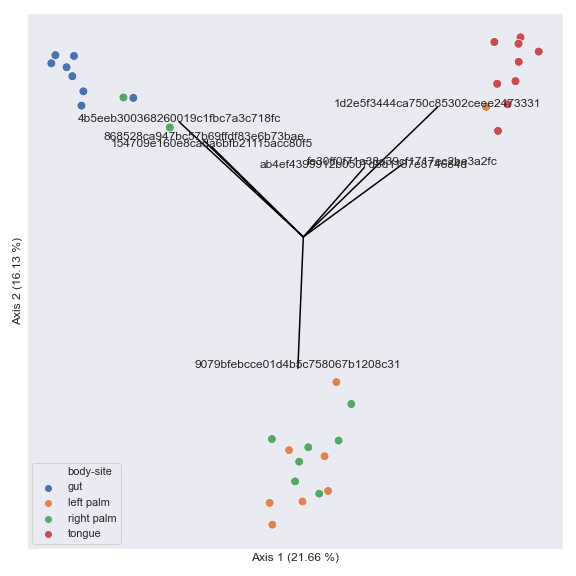
> You can also generate a biplot.
>
> ```auto
> pcoa_results = dokdo.ordinate(table_file, biplot=True, number_of_dimensions=10)
>
> fig, ax = plt.subplots(1, 1, figsize=(8, 8))
>
> dokdo.beta_2d_plot(pcoa_results, ax=ax, metadata=metadata_file, hue='body-site', artist_kwargs=dict(show_legend=True))
> dokdo.addbiplot(pcoa_results, ax=ax, count=7)
>
> plt.tight_layout()
> plt.savefig('images/Dokdo-API/ordinate-3-20201223.png')
>
> ```
>
> 
>
> # Main Plotting Methods
>
> ## read\_quality\_plot
>
> ```auto
> Help on function read_quality_plot in module dokdo.api:
>
> read_quality_plot(demux, strand='forward', ax=None, figsize=None, artist_kwargs=None)
> This method creates a read quality plot.
>
> Parameters
> ----------
> demux : str or qiime2.Visualization
> Visualization file or object from the q2-demux plugin.
> strand : str, default: 'forward'
> Read strand to be displayed (either 'forward' or 'reverse').
> ax : matplotlib.axes.Axes, optional
> Axes object to draw the plot onto, otherwise uses the current Axes.
> figsize : tuple, optional
> Width, height in inches. Format: (float, float).
> artist_kwargs : dict, optional
> Keyword arguments passed down to the _artist() method.
>
> Returns
> -------
> matplotlib.axes.Axes
> Axes object with the plot drawn onto it.
>
> Notes
> -----
> Example usage of the q2-demux plugin:
> CLI -> $ qiime demux summarize [OPTIONS]
> API -> from qiime2.plugins.demux.visualizers import summarize
>
> ```
>
> Below is a simple example.
>
> ```auto
> qzv_file = 'data/atacama-soil-microbiome-tutorial/demux-subsample.qzv'
>
> fig, [ax1, ax2] = plt.subplots(1, 2)
>
> artist_kwargs1 = dict(title='Forward read')
> artist_kwargs2 = dict(title='Reverse read', hide_ylabel=True, hide_yticklabels=True)
>
> dokdo.read_quality_plot(qzv_file, strand='forward', ax=ax1, artist_kwargs=artist_kwargs1)
> dokdo.read_quality_plot(qzv_file, strand='reverse', ax=ax2, artist_kwargs=artist_kwargs2)
>
> plt.tight_layout()
> plt.savefig('images/Dokdo-API/read_quality_plot-1C.png')
>
> ```
>
> 
>
> ## denoising\_stats\_plot
>
> ```auto
> Help on function denoising_stats_plot in module dokdo.api:
>
> denoising_stats_plot(stats, metadata, where, ax=None, figsize=None, pseudocount=False, order=None, hide_nsizes=False, artist_kwargs=None)
> This method creates a grouped box chart using denoising statistics from
> the DADA 2 algorithm.
>
> Parameters
> ----------
> stats : str or qiime2.Artifact
> Artifact file or object from the q2-dada2 plugin.
> metadata : str or qiime2.Metadata
> Metadata file or object.
> where : str
> Column name of the sample metadata.
> ax : matplotlib.axes.Axes, optional
> Axes object to draw the plot onto, otherwise uses the current Axes.
> figsize : tuple, optional
> Width, height in inches. Format: (float, float).
> pseudocount : bool, default: False
> Add pseudocount to remove zeros.
> order : list, optional
> Order to plot the categorical levels in.
> hide_nsizes : bool, default: False
> Hide sample size from x-axis labels.
> artist_kwargs : dict, optional
> Keyword arguments passed down to the _artist() method.
>
> Returns
> -------
> matplotlib.axes.Axes
> Axes object with the plot drawn onto it.
>
> Notes
> -----
> Example usage of the q2-dada2 plugin:
> CLI -> qiime dada2 denoise-paired [OPTIONS]
> API -> from qiime2.plugins.dada2.methods import denoise_paired
>
> ```
>
> Below is a simple example.
>
> ```auto
> qza_file = 'data/atacama-soil-microbiome-tutorial/denoising-stats.qza'
> metadata_file = 'data/atacama-soil-microbiome-tutorial/sample-metadata.tsv'
>
> dokdo.denoising_stats_plot(qza_file, metadata_file, 'transect-name', artist_kwargs=dict(show_legend=True))
>
> plt.tight_layout()
> plt.savefig('images/Dokdo-API/denoising_stats_plot-1C.png')
>
> ```
>
> 
>
> ## alpha\_rarefaction\_plot
>
> ```auto
> Help on function alpha_rarefaction_plot in module dokdo.api:
>
> alpha_rarefaction_plot(rarefaction, hue='sample-id', metric='shannon', ax=None, figsize=None, hue_order=None, units=None, estimator='mean', seed=1, artist_kwargs=None)
> This method creates an alpha rarefaction plot.
>
> Parameters
> ----------
> rarefaction : str or qiime2.Visualization
> Visualization file or object from the q2-diversity plugin.
> hue : str, default: 'sample-id'
> Grouping variable that will produce lines with different colors. If not
> provided, sample IDs will be used.
> metric : str, default: 'shannon'
> Diversity metric ('shannon', 'observed_features', or 'faith_pd').
> ax : matplotlib.axes.Axes, optional
> Axes object to draw the plot onto, otherwise uses the current Axes.
> figsize : tuple, optional
> Width, height in inches. Format: (float, float).
> hue_order : list, optional
> Specify the order of categorical levels of the 'hue' semantic.
> units : str, optional
> Grouping variable identifying sampling units. When used, a separate
> line will be drawn for each unit with appropriate semantics, but no
> legend entry will be added.
> estimator : str, default: 'mean', optional
> Method for aggregating across multiple observations of the y variable
> at the same x level. If None, all observations will be drawn.
> seed : int, default: 1
> Seed for reproducible bootstrapping.
> artist_kwargs : dict, optional
> Keyword arguments passed down to the _artist() method.
>
> Returns
> -------
> matplotlib.axes.Axes
> Axes object with the plot drawn onto it.
>
> Notes
> -----
> Example usage of the q2-diversity plugin:
> CLI -> qiime diversity alpha-rarefaction [OPTIONS]
> API -> from qiime2.plugins.diversity.visualizers import alpha_rarefaction
>
> ```
>
> Below is a simple example.
>
> ```auto
> qzv_file = 'data/moving-pictures-tutorial/alpha-rarefaction.qzv'
> artist_kwargs = dict(show_legend=True, legend_ncol=5)
>
> dokdo.alpha_rarefaction_plot(qzv_file,
> figsize=(8, 5),
> artist_kwargs=artist_kwargs)
>
> plt.tight_layout()
> plt.savefig('images/Dokdo-API/alpha_rarefaction_plot-1-20210109.png')
>
> ```
>
> 
>
> We can group the samples by body-site.
>
> ```auto
> artist_kwargs = dict(show_legend=True)
>
> dokdo.alpha_rarefaction_plot(qzv_file,
> hue='body-site',
> metric='observed_features',
> figsize=(8, 5),
> units='sample-id',
> estimator=None,
> artist_kwargs=artist_kwargs)
>
> plt.tight_layout()
> plt.savefig('images/Dokdo-API/alpha_rarefaction_plot-2-20210109.png')
>
> ```
>
> 
>
> Alternatively, we can aggregate the samples by body-site.
>
> ```auto
> artist_kwargs = dict(show_legend=True)
>
> dokdo.alpha_rarefaction_plot(qzv_file,
> hue='body-site',
> metric='observed_features',
> figsize=(8, 5),
> artist_kwargs=artist_kwargs)
>
> plt.tight_layout()
> plt.savefig('images/Dokdo-API/alpha_rarefaction_plot-3-20210109.png')
>
> ```
>
> 
>
> ## alpha\_diversity\_plot
>
> ```auto
> Help on function alpha_diversity_plot in module dokdo.api:
>
> alpha_diversity_plot(alpha_diversity, metadata, where, ax=None, figsize=None, add_swarmplot=False, order=None, artist_kwargs=None)
> Create an alpha diversity plot.
>
> Parameters
> ----------
> alpha_diversity : str or qiime2.Artifact
> Artifact file or object with the semantic type
> `SampleData[AlphaDiversity]`.
> metadata : str or qiime2.Metadata
> Metadata file or object.
> where : str
> Column name to be used for the x-axis.
> ax : matplotlib.axes.Axes, optional
> Axes object to draw the plot onto, otherwise uses the current Axes.
> figsize : tuple, optional
> Width, height in inches. Format: (float, float).
> add_swarmplot : bool, default: False
> Add a swarm plot on top of the box plot.
> order : list, optional
> Order to plot the categorical levels in.
> artist_kwargs : dict, optional
> Keyword arguments passed down to the _artist() method.
>
> Returns
> -------
> matplotlib.axes.Axes
> Axes object with the plot drawn onto it.
>
> ```
>
> Below is a simple example.
>
> ```auto
> qzv_file = 'data/moving-pictures-tutorial/faith_pd_vector.qza'
> metadata_file = 'data/moving-pictures-tutorial/sample-metadata.tsv'
>
> dokdo.alpha_diversity_plot(qzv_file, metadata_file, 'body-site')
>
> plt.tight_layout()
> plt.savefig('images/Dokdo-API/alpha_diversity_plot-1-20210203.png')
>
> ```
>
> 
>
> ## beta\_2d\_plot
>
> ```auto
> Help on function beta_2d_plot in module dokdo.api:
>
> beta_2d_plot(pcoa_results, metadata=None, hue=None, size=None, style=None, s=80, alpha=None, ax=None, figsize=None, hue_order=None, style_order=None, legend_type='brief', artist_kwargs=None)
> This method creates a 2D scatter plot from PCoA results.
>
> Parameters
> ----------
> pcoa_results : str or qiime2.Artifact
> Artifact file or object corresponding to PCoAResults or
> PCoAResults % Properties('biplot').
> metadata : str or qiime2.Metadata, optional
> Metadata file or object.
> hue : str, optional
> Grouping variable that will produce points with different colors.
> size : str, optional
> Grouping variable that will produce points with different sizes.
> style : str, optional
> Grouping variable that will produce points with different markers.
> s : float, default: 80.0
> Marker size.
> alpha : float, optional
> Proportional opacity of the points.
> ax : matplotlib.axes.Axes, optional
> Axes object to draw the plot onto, otherwise uses the current Axes.
> figsize : tuple, optional
> Width, height in inches. Format: (float, float).
> hue_order : list, optional
> Specify the order of categorical levels of the 'hue' semantic.
> style_order : list, optional
> Specify the order of categorical levels of the 'style' semantic.
> legend_type : str, default: 'brief'
> Legend type as in seaborn.scatterplot ('brief' or 'full').
> artist_kwargs : dict, optional
> Keyword arguments passed down to the _artist() method.
>
> Returns
> -------
> matplotlib.axes.Axes
> Axes object with the plot drawn onto it.
>
> See Also
> --------
> ordinate
> beta_3d_plot
> beta_scree_plot
> beta_parallel_plot
> addbiplot
>
> Notes
> -----
> Example usage of the q2-diversity plugin:
> CLI -> qiime diversity pcoa [OPTIONS]
> API -> from qiime2.plugins.diversity.methods import pcoa
>
> ```
>
> Below is a simple example.
>
> ```auto
> qza_file = 'data/moving-pictures-tutorial/unweighted_unifrac_pcoa_results.qza'
>
> dokdo.beta_2d_plot(qza_file)
>
> plt.tight_layout()
> plt.savefig('images/Dokdo-API/beta_2d_plot-1C.png')
>
> ```
>
> 
>
> We can color the datapoints with `hue`. We can also change the style of datapoints with `style`. If the variable of interest is numeric, we can use `size` to control the size of datapoints. Finally, we can combine all those groupings.
>
> ```auto
> metadata_file = 'data/moving-pictures-tutorial/sample-metadata.tsv'
>
> fig, [[ax1, ax2], [ax3, ax4]] = plt.subplots(2, 2, figsize=(8, 8))
>
> artist_kwargs1 = dict(show_legend=True, title="hue='body-site'")
> artist_kwargs2 = dict(show_legend=True, title="style='subject'")
> artist_kwargs3 = dict(show_legend=True, title="size='days-since-experiment-start'")
> artist_kwargs4 = dict(title="Combined groupings")
>
> dokdo.beta_2d_plot(qza_file, metadata_file, ax=ax1, hue='body-site', artist_kwargs=artist_kwargs1)
> dokdo.beta_2d_plot(qza_file, metadata_file, ax=ax2, style='subject', artist_kwargs=artist_kwargs2)
> dokdo.beta_2d_plot(qza_file, metadata_file, ax=ax3, size='days-since-experiment-start', artist_kwargs=artist_kwargs3)
> dokdo.beta_2d_plot(qza_file, metadata_file, ax=ax4, hue='body-site', style='subject', size='days-since-experiment-start', artist_kwargs=artist_kwargs4)
>
> plt.tight_layout()
> plt.savefig('images/Dokdo-API/beta_2d_plot-2C.png')
>
> ```
>
> 
>
> ## beta\_3d\_plot
>
> ```auto
> Help on function beta_3d_plot in module dokdo.api:
>
> beta_3d_plot(pcoa_results, metadata=None, hue=None, azim=-60, elev=30, s=80, ax=None, figsize=None, hue_order=None, artist_kwargs=None)
> This method creates a 3D scatter plot from PCoA results.
>
> Parameters
> ----------
> pcoa_results : str or qiime2.Artifact
> Artifact file or object corresponding to PCoAResults or
> PCoAResults % Properties('biplot').
> metadata : str or qiime2.Metadata, optional
> Metadata file or object.
> hue : str, optional
> Grouping variable that will produce points with different colors.
> azim : int, default: -60
> Elevation viewing angle.
> elev : int, default: 30
> Azimuthal viewing angle.
> s : float, default: 80.0
> Marker size.
> ax : matplotlib.axes.Axes, optional
> Axes object to draw the plot onto, otherwise uses the current Axes.
> figsize : tuple, optional
> Width, height in inches. Format: (float, float).
> hue_order : list, optional
> Specify the order of categorical levels of the 'hue' semantic.
> artist_kwargs : dict, optional
> Keyword arguments passed down to the _artist() method.
>
> Returns
> -------
> matplotlib.axes.Axes
> Axes object with the plot drawn onto it.
>
> See Also
> --------
> ordinate
> beta_2d_plot
> beta_scree_plot
> beta_parallel_plot
> addbiplot
>
> Notes
> -----
> Example usage of the q2-diversity plugin:
> CLI -> qiime diversity pcoa [OPTIONS]
> API -> from qiime2.plugins.diversity.methods import pcoa
>
> ```
>
> Below is a simple example.
>
> ```auto
> qza_file = 'data/moving-pictures-tutorial/unweighted_unifrac_pcoa_results.qza'
> metadata_file = 'data/moving-pictures-tutorial/sample-metadata.tsv'
>
> dokdo.beta_3d_plot(qza_file,
> metadata_file,
> 'body-site',
> figsize=(6, 6),
> artist_kwargs=dict(show_legend=True))
>
> plt.tight_layout()
> plt.savefig('images/Dokdo-API/beta_3d_plot-1-20210203.png')
>
> ```
>
> 
>
> We can control the camera angle with `elev` and `azim`.
>
> ```auto
> fig = plt.figure(figsize=(12, 6))
>
> ax1 = fig.add_subplot(1, 2, 1, projection='3d')
> ax2 = fig.add_subplot(1, 2, 2, projection='3d')
>
> dokdo.beta_3d_plot(qza_file, metadata_file, ax=ax1, hue='body-site', elev=15)
> dokdo.beta_3d_plot(qza_file, metadata_file, ax=ax2, hue='body-site', azim=70)
>
> plt.tight_layout()
> plt.savefig('images/Dokdo-API/beta_3d_plot-2-20210203.png')
>
> ```
>
> 
>
> ## beta\_scree\_plot
>
> ```auto
> Help on function beta_scree_plot in module dokdo.api:
>
> beta_scree_plot(pcoa_results, count=5, ax=None, figsize=None, color='blue', artist_kwargs=None)
> This method creates a scree plot from PCoA results.
>
> Parameters
> ----------
> pcoa_results : str or qiime2.Artifact
> Artifact file or object corresponding to PCoAResults.
> count : int, default: 5
> Number of principal components to be displayed.
> ax : matplotlib.axes.Axes, optional
> Axes object to draw the plot onto, otherwise uses the current Axes.
> figsize : tuple, optional
> Width, height in inches. Format: (float, float).
> color : str, default: 'blue'
> Bar color.
> artist_kwargs : dict, optional
> Keyword arguments passed down to the _artist() method.
>
> Returns
> -------
> matplotlib.axes.Axes
> Axes object with the plot drawn onto it.
>
> See Also
> --------
> ordinate
> beta_2d_plot
> beta_3d_plot
> beta_parallel_plot
>
> Notes
> -----
> Example usage of the q2-diversity plugin:
> CLI -> qiime diversity pcoa [OPTIONS]
> API -> from qiime2.plugins.diversity.methods import pcoa
>
> ```
>
> Below is a simple example.
>
> ```auto
> qza_file = 'data/moving-pictures-tutorial/unweighted_unifrac_pcoa_results.qza'
>
> dokdo.beta_scree_plot(qza_file)
>
> plt.tight_layout()
> plt.savefig('images/Dokdo-API/beta_scree_plot-1-20201217.png')
>
> ```
>
> 
>
> ## beta\_parallel\_plot
>
> ```auto
> Help on function beta_parallel_plot in module dokdo.api:
>
> beta_parallel_plot(pcoa_results, hue=None, hue_order=None, metadata=None, count=5, ax=None, figsize=None, artist_kwargs=None)
> This method creates a parallel plot from PCoA results.
>
> Parameters
> ----------
> pcoa_results : str or qiime2.Artifact
> Artifact file or object corresponding to PCoAResults.
> hue : str, optional
> Grouping variable that will produce lines with different colors.
> hue_order : list, optional
> Specify the order of categorical levels of the 'hue' semantic.
> metadata : str or qiime2.Metadata, optional
> Metadata file or object. Required if 'hue' is used.
> count : int, default: 5
> Number of principal components to be displayed.
> ax : matplotlib.axes.Axes, optional
> Axes object to draw the plot onto, otherwise uses the current Axes.
> figsize : tuple, optional
> Width, height in inches. Format: (float, float).
> artist_kwargs : dict, optional
> Keyword arguments passed down to the _artist() method.
>
> Returns
> -------
> matplotlib.axes.Axes
> Axes object with the plot drawn onto it.
>
> See Also
> --------
> ordinate
> beta_2d_plot
> beta_3d_plot
> beta_scree_plot
>
> Notes
> -----
> Example usage of the q2-diversity plugin:
> CLI -> qiime diversity pcoa [OPTIONS]
> API -> from qiime2.plugins.diversity.methods import pcoa
>
> ```
>
> Below is a simple example.
>
> ```auto
> qza_file = 'data/moving-pictures-tutorial/unweighted_unifrac_pcoa_results.qza'
>
> dokdo.beta_parallel_plot(qza_file)
>
> plt.tight_layout()
> plt.savefig('images/Dokdo-API/beta_parallel_plot-1-20210202.png')
>
> ```
>
> 
>
> We can group the lines by body-site.
>
> ```auto
> metadata_file = 'data/moving-pictures-tutorial/sample-metadata.tsv'
>
> dokdo.beta_parallel_plot(qza_file, metadata=metadata_file, hue='body-site', artist_kwargs=dict(show_legend=True))
>
> plt.tight_layout()
> plt.savefig('images/Dokdo-API/beta_parallel_plot-2-20210202.png')
>
> ```
>
> 
>
> ## distance\_matrix\_plot
>
> ```auto
> Help on function distance_matrix_plot in module dokdo.api:
>
> distance_matrix_plot(distance_matrix, bins=100, pairs=None, ax=None, figsize=None, artist_kwargs=None)
> This method creates a histogram from a distance matrix.
>
> Parameters
> ----------
> distance_matrix : str or qiime2.Artifact
> Artifact file or object from the q2-diversity-lib plugin.
> bins : int, optional
> Number of bins to be displayed.
> pairs : list, optional
> List of sample pairs to be shown in red vertical lines.
> ax : matplotlib.axes.Axes, optional
> Axes object to draw the plot onto, otherwise uses the current Axes.
> figsize : tuple, optional
> Width, height in inches. Format: (float, float).
> artist_kwargs : dict, optional
> Keyword arguments passed down to the _artist() method.
>
> Returns
> -------
> matplotlib.axes.Axes
> Axes object with the plot drawn onto it.
>
> Notes
> -----
> Example usage of the q2-diversity-lib plugin:
> CLI -> qiime diversity-lib jaccard [OPTIONS]
> API -> from qiime2.plugins.diversity_lib.methods import jaccard
>
> ```
>
> Below is a simple example.
>
> ```auto
> qza_file = 'data/moving-pictures-tutorial/unweighted_unifrac_distance_matrix.qza'
>
> dokdo.distance_matrix_plot(qza_file)
>
> plt.tight_layout()
> plt.savefig('images/Dokdo-API/distance_matrix_plot-1C.png')
>
> ```
>
> 
>
> We can indicate the distance between any two samples on top of the histogram using `pairs`.
>
> ```auto
> dokdo.distance_matrix_plot(qza_file, pairs=[['L1S8', 'L1S57'], ['L2S175', 'L2S204']])
>
> plt.tight_layout()
> plt.savefig('images/Dokdo-API/distance_matrix_plot-2C.png')
>
> ```
>
> 
>
> ## taxa\_abundance\_bar\_plot
>
> ```auto
> Help on function taxa_abundance_bar_plot in module dokdo.api:
>
> taxa_abundance_bar_plot(taxa, metadata=None, level=1, by=None, ax=None, figsize=None, width=0.8, count=0, exclude_samples=None, include_samples=None, exclude_taxa=None, sort_by_names=False, colors=None, label_columns=None, orders=None, sample_names=None, csv_file=None, taxa_names=None, sort_by_mean1=True, sort_by_mean2=True, sort_by_mean3=True, show_others=True, cmap_name='Accent', artist_kwargs=None)
> This method creates a taxa abundance plot.
>
> Although the input visualization file should contain medatadata already,
> you can replace it with new metadata by using the 'metadata' option.
>
> Parameters
> ----------
> taxa : str or qiime2.Visualization
> Visualization file or object from the q2-taxa plugin.
> metadata : str or qiime2.Metadata, optional
> Metadata file or object.
> level : int, default: 1
> Taxonomic level at which the features should be collapsed.
> by : list, optional
> Column name(s) to be used for sorting the samples. Using 'sample-id'
> will sort the samples by their name, in addition to other column
> name(s) that may have been provided. If multiple items are provided,
> sorting will occur by the order of the items.
> ax : matplotlib.axes.Axes, optional
> Axes object to draw the plot onto, otherwise uses the current Axes.
> figsize : tuple, optional
> Width, height in inches. Format: (float, float).
> width : float, default: 0.8
> The width of the bars.
> count : int, default: 0
> The number of taxa to display. When 0, display all.
> exclude_samples : dict, optional
> Filtering logic used for sample exclusion.
> Format: {'col': ['item', ...], ...}.
> include_samples : dict, optional
> Filtering logic used for sample inclusion.
> Format: {'col': ['item', ...], ...}.
> exclude_taxa : list, optional
> The taxa names to be excluded when matched. Case insenstivie.
> sort_by_names : bool, default: False
> If true, sort the columns (i.e. species) to be displayed by name.
> colors : list, optional
> The bar colors.
> label_columns : list, optional
> The column names to be used as the x-axis labels.
> orders : dict, optional
> Dictionary of {column1: [element1, element2, ...], column2:
> [element1, element2...], ...} to indicate the order of items. Used to
> sort the sampels by the user-specified order instead of ordering
> numerically or alphabetically.
> sample_names : list, optional
> List of sample IDs to be included.
> csv_file : str, optional
> Path of the .csv file to output the dataframe to.
> taxa_names : list, optional
> List of taxa names to be displayed.
> sort_by_mean1 : bool, default: True
> Sort taxa by their mean relative abundance before sample filtration.
> sort_by_mean2 : bool, default: True
> Sort taxa by their mean relative abundance after sample filtration by
> 'include_samples' or 'exclude_samples'.
> sort_by_mean3 : bool, default: True
> Sort taxa by their mean relative abundance after sample filtration by
> 'sample_names'.
> show_others : bool, default: True
> Include the 'Others' category.
> cmap_name : str, default: 'Accent'
> Name of the colormap passed to `matplotlib.cm.get_cmap()`.
> artist_kwargs : dict, optional
> Keyword arguments passed down to the _artist() method.
>
> Returns
> -------
> matplotlib.axes.Axes
> Axes object with the plot drawn onto it.
>
> See Also
> --------
> taxa_abundance_box_plot
>
> Notes
> -----
> Example usage of the q2-taxa plugin:
> CLI -> qiime taxa barplot [OPTIONS]
> API -> from qiime2.plugins.taxa.visualizers import barplot
>
> ```
>
> Below is a simple example showing taxonomic abundance at the kingdom level (i.e. `level=1`), which is the default taxonomic rank.
>
> ```auto
> qzv_file = 'data/moving-pictures-tutorial/taxa-bar-plots.qzv'
>
> dokdo.taxa_abundance_bar_plot(qzv_file,
> figsize=(10, 7),
> artist_kwargs=dict(show_legend=True))
>
> plt.tight_layout()
> plt.savefig('images/Dokdo-API/taxa_abundance_bar_plot-1-20210109.png')
>
> ```
>
> 
>
> We can change the taxonomic rank from kingdom to genus by setting `level=6`. Note that I removed `show_legend=True` because otherwise there will be too many taxa to display on the legend. Note also that the colors are recycled in each bar.
>
> ```auto
> dokdo.taxa_abundance_bar_plot(qzv_file,
> figsize=(10, 7),
> level=6)
>
> plt.tight_layout()
> plt.savefig('images/Dokdo-API/taxa_abundance_bar_plot-2-20210109.png')
>
> ```
>
> 
>
> We can only show the top seven most abundant genera plus 'Others' with `count=8`.
>
> ```auto
> dokdo.taxa_abundance_bar_plot(qzv_file,
> figsize=(10, 7),
> level=6,
> count=8,
> artist_kwargs=dict(show_legend=True,
> legend_loc='upper left',
> legend_short=True))
>
> plt.tight_layout()
> plt.savefig('images/Dokdo-API/taxa_abundance_bar_plot-3-20210109.png')
>
> ```
>
> 
>
> We can plot the figure and the legend separately.
>
> ```auto
> fig, [ax1, ax2] = plt.subplots(1, 2, figsize=(12, 7), gridspec_kw={'width_ratios': [9, 1]})
>
> dokdo.taxa_abundance_bar_plot(qzv_file,
> ax=ax1,
> level=6,
> count=8)
>
> dokdo.taxa_abundance_bar_plot(qzv_file,
> ax=ax2,
> level=6,
> count=8,
> artist_kwargs=dict(legend_only=True,
> legend_loc='upper left',
> legend_short=True))
>
> plt.tight_layout()
> plt.savefig('images/Dokdo-API/taxa_abundance_bar_plot-4-20210109.png')
>
> ```
>
> 
>
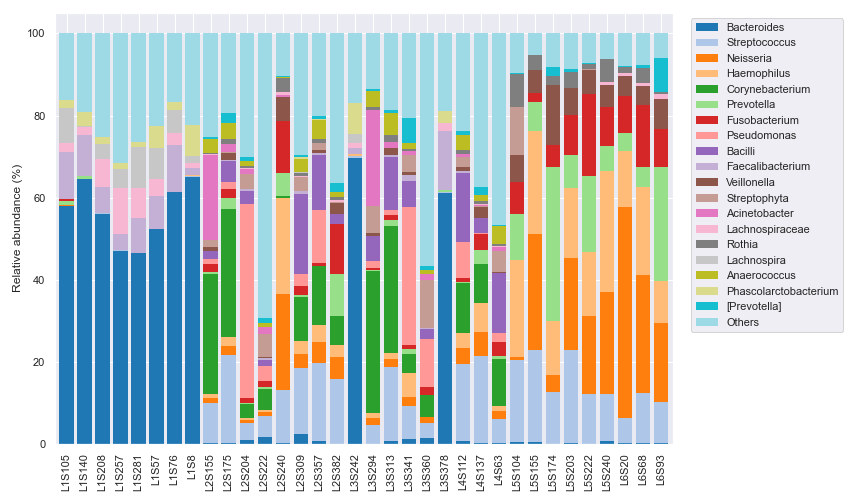
> We can use a different color map to display more unique genera (e.g. 20).
>
> ```auto
> fig, [ax1, ax2] = plt.subplots(1, 2, figsize=(12, 7), gridspec_kw={'width_ratios': [9, 1]})
>
> dokdo.taxa_abundance_bar_plot(qzv_file,
> ax=ax1,
> level=6,
> count=20,
> cmap_name='tab20')
>
> dokdo.taxa_abundance_bar_plot(qzv_file,
> ax=ax2,
> level=6,
> count=20,
> cmap_name='tab20',
> artist_kwargs=dict(legend_only=True,
> legend_loc='upper left',
> legend_short=True))
>
> plt.tight_layout()
> plt.savefig('images/Dokdo-API/taxa_abundance_bar_plot-5-20210109.png')
>
> ```
>
> 
>
> We can sort the samples by the body-site column in metadata with `by=['body-site']`. To check whether the sorting worked properly, we can change the x-axis tick labels to include each sample's body-site with `label_columns`.
>
> ```auto
> dokdo.taxa_abundance_bar_plot(qzv_file,
> by=['body-site'],
> label_columns=['body-site', 'sample-id'],
> figsize=(10, 7),
> level=6,
> count=8,
> artist_kwargs=dict(show_legend=True,
> legend_loc='upper left',
> legend_short=True))
>
> plt.tight_layout()
> plt.savefig('images/Dokdo-API/taxa_abundance_bar_plot-6-20210109.png')
>
> ```
>
> 
>
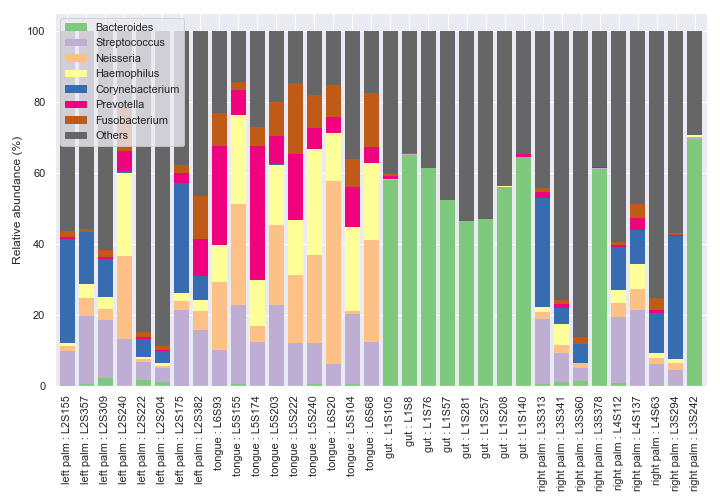
> If you want to sort the samples in a certain order instead of ordering numerically or alphabetically, use the `orders` option.
>
> ```auto
> dokdo.taxa_abundance_bar_plot(qzv_file,
> by=['body-site'],
> label_columns=['body-site', 'sample-id'],
> figsize=(10, 7),
> level=6,
> count=8,
> orders={'body-site': ['left palm', 'tongue', 'gut', 'right palm']},
> artist_kwargs=dict(show_legend=True,
> legend_loc='upper left',
> legend_short=True))
>
> plt.tight_layout()
> plt.savefig('images/Dokdo-API/taxa_abundance_bar_plot-7-20210109.png')
>
> ```
>
> 
>
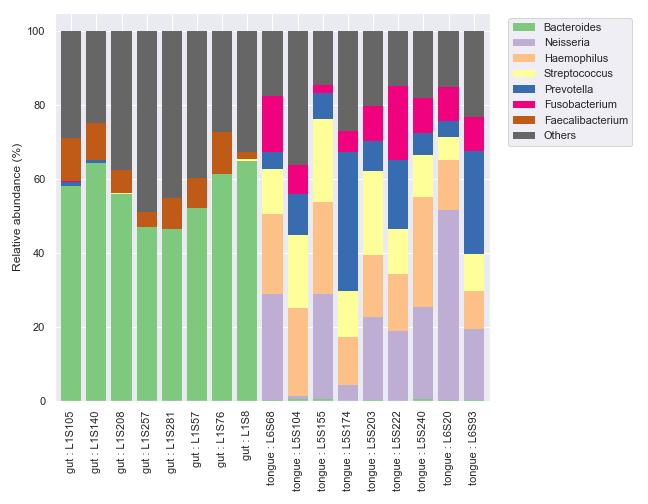
> We can only display the 'gut' and 'tongue' samples with `include_samples`.
>
> ```auto
> fig, [ax1, ax2] = plt.subplots(1, 2, figsize=(9, 7), gridspec_kw={'width_ratios': [9, 1]})
>
> kwargs = dict(include_samples={'body-site': ['gut', 'tongue']},
> by=['body-site'],
> label_columns=['body-site', 'sample-id'],
> level=6,
> count=8)
>
> dokdo.taxa_abundance_bar_plot(qzv_file,
> ax=ax1,
> **kwargs)
>
> dokdo.taxa_abundance_bar_plot(qzv_file,
> ax=ax2,
> **kwargs,
> artist_kwargs=dict(legend_only=True,
> legend_loc='upper left',
> legend_short=True))
>
> plt.tight_layout()
> plt.savefig('images/Dokdo-API/taxa_abundance_bar_plot-8-20210109.png')
>
> ```
>
> 
>
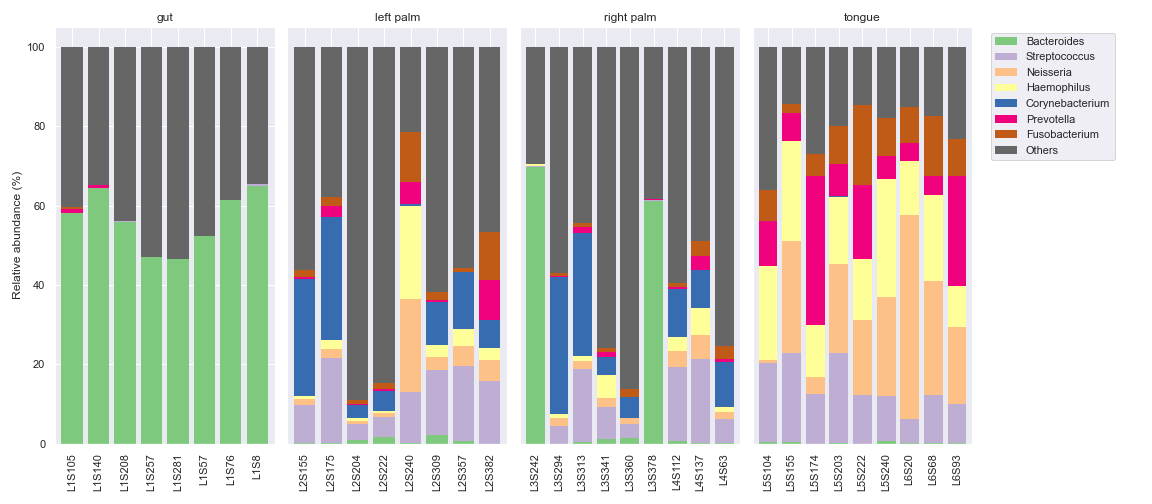
> We can make multiple bar charts grouped by body-site. When making a grouped bar chart, it's important to include `sort_by_mean2=False` in order to have the same bar colors for the same taxa across different groups.
>
> ```auto
> fig, [ax1, ax2, ax3, ax4, ax5] = plt.subplots(1, 5, figsize=(16, 7), gridspec_kw={'width_ratios': [2, 2, 2, 2, 1]})
>
> kwargs = dict(level=6, count=8, sort_by_mean2=False)
>
> dokdo.taxa_abundance_bar_plot(qzv_file,
> ax=ax1,
> include_samples={'body-site': ['gut']},
> **kwargs,
> artist_kwargs=dict(title='gut'))
>
> dokdo.taxa_abundance_bar_plot(qzv_file,
> ax=ax2,
> include_samples={'body-site': ['left palm']},
> **kwargs,
> artist_kwargs=dict(title='left palm',
> hide_ylabel=True,
> hide_yticks=True))
>
> dokdo.taxa_abundance_bar_plot(qzv_file,
> ax=ax3,
> include_samples={'body-site': ['right palm']},
> **kwargs,
> artist_kwargs=dict(title='right palm',
> hide_ylabel=True,
> hide_yticks=True))
>
> dokdo.taxa_abundance_bar_plot(qzv_file,
> ax=ax4,
> include_samples={'body-site': ['tongue']},
> **kwargs,
> artist_kwargs=dict(title='tongue',
> hide_ylabel=True,
> hide_yticks=True))
>
> dokdo.taxa_abundance_bar_plot(qzv_file,
> ax=ax5,
> **kwargs,
> artist_kwargs=dict(legend_only=True,
> legend_loc='upper left',
> legend_short=True))
>
> plt.tight_layout()
> plt.savefig('images/Dokdo-API/taxa_abundance_bar_plot-9-20210109.png')
>
> ```
>
> 
>
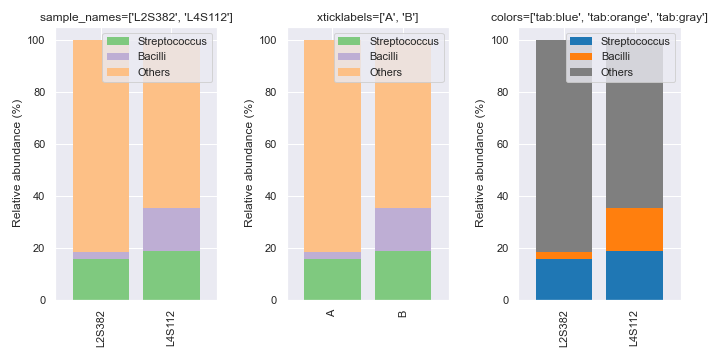
> We can select specific samples with `sample_names`. We can also manually set the x-axis tick labels with `xticklabels`. Finally, you can pick specific colors for the bars.
>
> ```auto
> fig, [ax1, ax2, ax3] = plt.subplots(1, 3, figsize=(10, 5))
>
> kwargs = dict(level=6, count=3, sample_names=['L2S382', 'L4S112'])
>
> dokdo.taxa_abundance_bar_plot(qzv_file,
> ax=ax1,
> **kwargs,
> artist_kwargs=dict(show_legend=True,
> legend_short=True,
> legend_loc='upper right',
> title="sample_names=['L2S382', 'L4S112']"))
>
> dokdo.taxa_abundance_bar_plot(qzv_file,
> ax=ax2,
> **kwargs,
> artist_kwargs=dict(show_legend=True,
> legend_short=True,
> legend_loc='upper right',
> title="xticklabels=['A', 'B']",
> xticklabels=['A', 'B']))
>
> dokdo.taxa_abundance_bar_plot(qzv_file,
> ax=ax3,
> colors=['tab:blue', 'tab:orange', 'tab:gray'],
> **kwargs,
> artist_kwargs=dict(show_legend=True,
> legend_short=True,
> legend_loc='upper right',
> title="colors=['tab:blue', 'tab:orange', 'tab:gray']"))
>
> plt.tight_layout()
> plt.savefig('images/Dokdo-API/taxa_abundance_bar_plot-10-20210109.png')
>
> ```
>
> 
>
> ## taxa\_abundance\_box\_plot
>
> ```auto
> taxa_abundance_box_plot(taxa, metadata=None, hue=None, hue_order=None, add_datapoints=False, level=1, by=None, ax=None, figsize=None, count=0, exclude_samples=None, include_samples=None, exclude_taxa=None, sort_by_names=False, sample_names=None, csv_file=None, size=5, pseudocount=False, taxa_names=None, brief_xlabels=False, show_means=False, meanprops=None, show_others=True, sort_by_mean=True, jitter=1, alpha=None, artist_kwargs=None)
> This method creates a taxa abundance box plot.
>
> Parameters
> ----------
> taxa : str or qiime2.Visualization
> Visualization file or object from the q2-taxa plugin.
> metadata : str or qiime2.Metadata, optional
> Metadata file or object.
> hue : str, optional
> Grouping variable that will produce boxes with different colors.
> hue_order : list, optional
> Specify the order of categorical levels of the 'hue' semantic.
> add_datapoints : bool, default: False
> Show datapoints on top of the boxes.
> level : int, default: 1
> Taxonomic level at which the features should be collapsed.
> by : list, optional
> Column name(s) to be used for sorting the samples. Using 'sample-id'
> will sort the samples by their name, in addition to other column
> name(s) that may have been provided. If multiple items are provided,
> sorting will occur by the order of the items.
> ax : matplotlib.axes.Axes, optional
> Axes object to draw the plot onto, otherwise uses the current Axes.
> figsize : tuple, optional
> Width, height in inches. Format: (float, float).
> count : int, default: 0
> The number of taxa to display. When 0, display all.
> exclude_samples : dict, optional
> Filtering logic used for sample exclusion.
> Format: {'col': ['item', ...], ...}.
> include_samples : dict, optional
> Filtering logic used for sample inclusion.
> Format: {'col': ['item', ...], ...}.
> exclude_taxa : list, optional
> The taxa names to be excluded when matched. Case insenstivie.
> sort_by_names : bool, default: False
> If true, sort the columns (i.e. species) to be displayed by name.
> sample_names : list, optional
> List of sample IDs to be included.
> csv_file : str, optional
> Path of the .csv file to output the dataframe to.
> size : float, default: 5.0
> Radius of the markers, in points.
> pseudocount : bool, default: False
> Add pseudocount to remove zeros.
> taxa_names : list, optional
> List of taxa names to be displayed.
> brief_xlabels : bool, default: False
> If true, only display the smallest taxa rank in the x-axis labels.
> show_means : bool, default: False
> Add means to the boxes.
> meanprops : dict, optional
> The meanprops argument as in matplotlib.pyplot.boxplot.
> show_others : bool, default: True
> Include the 'Others' category.
> sort_by_mean : bool, default: True
> Sort taxa by their mean relative abundance after sample filtration.
> jitter : float, default: 1
> Amount of jitter (only along the categorical axis) to apply.
> alpha : float, optional
> Proportional opacity of the points.
> artist_kwargs : dict, optional
> Keyword arguments passed down to the _artist() method.
>
> Returns
> -------
> matplotlib.axes.Axes
> Axes object with the plot drawn onto it.
>
> See Also
> --------
> taxa_abundance_bar_plot
> addpairs
>
> Notes
> -----
> Example usage of the q2-taxa plugin:
> CLI -> qiime taxa barplot [OPTIONS]
> API -> from qiime2.plugins.taxa.visualizers import barplot
>
> ```
>
> Below is a simple example showing taxonomic abundance at the phylum level (i.e. `level=2`).
>
> ```auto
> qzv_file = 'data/moving-pictures-tutorial/taxa-bar-plots.qzv'
>
> dokdo.taxa_abundance_box_plot(qzv_file, level=2)
>
> plt.tight_layout()
> plt.savefig('images/Dokdo-API/taxa_abundance_box_plot-1-20210202.png')
>
> ```
>
> 
>
> We can control how many taxa to display with `count`. Also, we can make the x-axis tick labels pretty with `brief_xlabels`. We can manually set the x-axis tick labels with `xticklabels`. Lastly, we can select specific taxa to display with `taxa_names`.
>
> ```auto
> fig, [[ax1, ax2], [ax3, ax4]] = plt.subplots(2, 2, figsize=(10, 10))
>
> kwargs = {'level' : 2}
>
> artist_kwargs1 = dict(title='count=4')
> artist_kwargs2 = dict(title='brief_xlabels=True')
> artist_kwargs3 = dict(xticklabels=['A', 'B', 'C', 'D'], title="xticklabels=['A', 'B', 'C', 'D']")
> artist_kwargs4 = dict(title="taxa_names=[...]")
>
> dokdo.taxa_abundance_box_plot(qzv_file, ax=ax1, count=4, artist_kwargs=artist_kwargs1, **kwargs)
> dokdo.taxa_abundance_box_plot(qzv_file, ax=ax2, count=4, brief_xlabels=True, artist_kwargs=artist_kwargs2, **kwargs)
> dokdo.taxa_abundance_box_plot(qzv_file, ax=ax3, count=4, artist_kwargs=artist_kwargs3, **kwargs)
> dokdo.taxa_abundance_box_plot(qzv_file, ax=ax4, taxa_names=['k __Bacteria;p__ Firmicutes', 'k __Bacteria;p__ Proteobacteria'], artist_kwargs=artist_kwargs4, **kwargs)
>
> plt.tight_layout()
> plt.savefig('images/Dokdo-API/taxa_abundance_box_plot-2-20210202.png')
>
> ```
>
> 
>
> We can group the boxes by a metadata column with `hue`. For this plot, we will draw the y-axis in log scale with `ylog`. To do this, we actually need to adjust the y-axis limits with `ymin` and `ymax`, and also add a pseudocount of 1 to remove 0s with `pseudocount` (because 0s cannot be shown in log scale). We will also add data points with `add_datapoints=True`.
>
> ```auto
> artist_kwargs = dict(ylog=True, ymin=0.05, ymax=200, show_legend=True)
>
> dokdo.taxa_abundance_box_plot(qzv_file,
> level=2,
> figsize=(10, 7),
> hue='body-site',
> size=3,
> count=4,
> pseudocount=True,
> add_datapoints=True,
> artist_kwargs=artist_kwargs)
>
> plt.tight_layout()
> plt.savefig('images/Dokdo-API/taxa_abundance_box_plot-3-20210202.png')
>
> ```
>
> 
>
> ## ancom\_volcano\_plot
>
> ```auto
> Help on function ancom_volcano_plot in module dokdo.api:
>
> ancom_volcano_plot(ancom, ax=None, figsize=None, s=80, artist_kwargs=None)
> This method creates an ANCOM volcano plot.
>
> Parameters
> ----------
> ancom : str
> Visualization file or object from the q2-composition plugin.
> ax : matplotlib.axes.Axes, optional
> Axes object to draw the plot onto, otherwise uses the current Axes.
> figsize : tuple, optional
> Width, height in inches. Format: (float, float).
> s : float, default: 80.0
> Marker size.
> artist_kwargs : dict, optional
> Keyword arguments passed down to the _artist() method.
>
> Returns
> -------
> matplotlib.axes.Axes
> Axes object with the plot drawn onto it.
>
> Notes
> -----
> Example usage of the q2-composition plugin:
> CLI -> qiime composition ancom [OPTIONS]
> API -> from qiime2.plugins.composition.visualizers import ancom
>
> ```
>
> Below is a simple example.
>
> ```auto
> dokdo.ancom_volcano_plot('data/moving-pictures-tutorial/ancom-subject.qzv', figsize=(8, 5))
>
> plt.tight_layout()
> plt.savefig('images/Dokdo-API/ancom_volcano_plot-1C.png')
>
> ```
>
> 
>
> # Other Plotting Methods
>
> ## addsig
>
> ```auto
> Help on function addsig in module dokdo.api:
>
> addsig(x1, x2, y, t='', h=1.0, lw=1.0, lc='black', tc='black', ax=None, figsize=None, fontsize=None)
> This method adds signifiance annotation between two groups in a box plot.
>
> Parameters
> ----------
> x1 : float
> Position of the first box.
> x2 : float
> Position of the second box.
> y : float
> Bottom position of the drawing.
> t : str, default: ''
> Text.
> h : float, default: 1.0
> Height of the drawing.
> lw : float, default: 1.0
> Line width.
> lc : str, default: 'black'
> Line color.
> tc : str, default: 'black'
> Text color.
> ax : matplotlib.axes.Axes, optional
> Axes object to draw the plot onto, otherwise uses the current Axes.
> figsize : tuple, optional
> Width, height in inches. Format: (float, float).
> fontsize : float, optional
> Sets the fontsize.
>
> Returns
> -------
> matplotlib.axes.Axes
> Axes object with the plot drawn onto it.
>
> ```
>
> Below is a simple example.
>
> ```auto
> vector_file = 'data/moving-pictures-tutorial/faith_pd_vector.qza'
> metadata_file = 'data/moving-pictures-tutorial/sample-metadata.tsv'
>
> ax = dokdo.alpha_diversity_plot(vector_file,
> metadata_file,
> 'body-site',
> figsize=(8, 5),
> artist_kwargs=dict(ymin=0, ymax=30))
>
> dokdo.addsig(0, 1, 20, t='***', ax=ax)
> dokdo.addsig(1, 2, 26, t='ns', ax=ax)
>
> plt.tight_layout()
> plt.savefig('images/Dokdo-API/addsig-1-20210203.png')
>
> ```
>
> 
>
> ## addpairs
>
> ```auto
> Help on function addpairs in module dokdo.api:
>
> addpairs(taxon, csv_file, subject, category, group1, group2, p1=-0.2, p2=0.2, ax=None, figsize=None)
> This method adds lines between two groups in a plot generated by the
> taxa_abundance_box_plot() method.
>
> This method also prints the p-value for Wilcoxon signed-rank test.
>
> Parameters
> ----------
> taxon : str
> Target taxon name.
> csv_file : str
> Path to the .csv file from the `taxa_abundance_box_plot` method.
> subject : str
> Column name to indicate pair information.
> category : str
> Column name to be studied.
> group1 : str
> First group in the category column.
> group2 : str
> Second group in the category column.
> p1 : float, default: -0.2
> Start position of the lines.
> p2 : float, default: 0.2
> End position of the lines.
> ax : matplotlib.axes.Axes, optional
> Axes object to draw the plot onto, otherwise uses the current Axes.
> figsize : tuple, optional
> Width, height in inches. Format: (float, float).
>
> Returns
> -------
> matplotlib.axes.Axes
> Axes object with the plot drawn onto it.
>
> See Also
> --------
> taxa_abundance_box_plot
>
> ```
>
> Below is a simple example where we pretend we only have the samples shown below. We are interested in comparing the relative abundance of Preteobacteria between the left palm and the right palm. We also want to perofrm the comparison in the context of days-since-experiment-start (i.e. paired comparison).
>
> ```auto
> from qiime2 import Metadata
>
> metadata = Metadata.load('data/moving-pictures-tutorial/sample-metadata.tsv')
> sample_names = ['L2S240', 'L3S242', 'L2S155', 'L4S63', 'L2S175', 'L3S313', 'L2S204', 'L4S112', 'L2S222', 'L4S137']
> metadata = metadata.filter_ids(sample_names)
> mf = dokdo.get_mf(metadata)
> mf
>
> ```
>
> | | barcode-sequence | body-site | year | month | day | subject | reported-antibiotic-usage | days-since-experiment-start |
> | --- | --- | --- | --- | --- | --- | --- | --- | --- |
> | sample-id | | | | | | | | |
> | --- | --- | --- | --- | --- | --- | --- | --- | --- |
> | L2S155 | ACGATGCGACCA | left palm | 2009.0 | 1.0 | 20.0 | subject-1 | No | 84.0 |
> | L2S175 | AGCTATCCACGA | left palm | 2009.0 | 2.0 | 17.0 | subject-1 | No | 112.0 |
> | L2S204 | ATGCAGCTCAGT | left palm | 2009.0 | 3.0 | 17.0 | subject-1 | No | 140.0 |
> | L2S222 | CACGTGACATGT | left palm | 2009.0 | 4.0 | 14.0 | subject-1 | No | 168.0 |
> | L3S242 | ACAGTTGCGCGA | right palm | 2008.0 | 10.0 | 28.0 | subject-1 | Yes | 0.0 |
> | L3S313 | AGTGTCACGGTG | right palm | 2009.0 | 2.0 | 17.0 | subject-1 | No | 112.0 |
> | L2S240 | CATATCGCAGTT | left palm | 2008.0 | 10.0 | 28.0 | subject-2 | Yes | 0.0 |
> | L4S63 | CTCGTGGAGTAG | right palm | 2009.0 | 1.0 | 20.0 | subject-2 | No | 84.0 |
> | L4S112 | GCGTTACACACA | right palm | 2009.0 | 3.0 | 17.0 | subject-2 | No | 140.0 |
> | L4S137 | GAACTGTATCTC | right palm | 2009.0 | 4.0 | 14.0 | subject-2 | No | 168.0 |
>
> ```auto
> qzv_file = 'data/moving-pictures-tutorial/taxa-bar-plots.qzv'
>
> ax = dokdo.taxa_abundance_box_plot(qzv_file,
> level=2,
> hue='body-site',
> taxa_names=['k __Bacteria;p__ Proteobacteria'],
> show_others=False,
> figsize=(6, 6),
> sample_names=sample_names,
> add_datapoints=True,
> include_samples={'body-site': ['left palm', 'right palm']},
> csv_file='output/Dokdo-API/addpairs.csv',
> artist_kwargs=dict(show_legend=True, ymax=70))
>
> plt.tight_layout()
> dokdo.addpairs('k __Bacteria;p__ Proteobacteria', 'output/Dokdo-API/addpairs.csv', 'days-since-experiment-start', 'body-site', 'left palm', 'right palm', ax=ax)
> dokdo.addsig(-0.2, 0.2, 65, t='p-value = 0.0625', ax=ax)
> plt.savefig('images/Dokdo-API/addpairs-1-20210203.png')
>
> ```
>
> 
>
> ## addbiplot
>
> ```auto
> Help on function addbiplot in module dokdo.api:
>
> addbiplot(pcoa_results, taxonomy=None, dim=2, scale=1.0, count=5, fontsize=None, name_type='feature', level=None, ax=None, figsize=None)
> This methods adds arrows (i.e. features) to a PCoA scatter plot (both 2D
> and 3D).
>
> Parameters
> ----------
> pcoa_results : str or qiime2.Artifact
> Artifact file or object corresponding to
> PCoAResults % Properties('biplot').
> taxonomy : str or qiime2.Artifact
> Artifact file or object corresponding to FeatureData[Taxonomy].
> Required if `name_type='taxon'` or `name_type='confidence'.
> dim : [2, 3], default: 2
> Dimension of the input scatter plot.
> scale : float, default: 1.0
> Scale for arrow length.
> count : int, default: 5
> Number of important features to be displayed.
> fontsize : float or str, optional
> Sets font size.
> name_type : ['feature', 'taxon', 'confidence'], default: 'feature'
> Determines the type of names displayed. Using 'taxon' and 'confidence'
> requires taxonomy.
> level : int, optional
> Taxonomic rank to be displayed. Only use with `name_type='taxon'`.
> ax : matplotlib.axes.Axes, optional
> Axes object to draw the plot onto, otherwise uses the current Axes.
> figsize : tuple, optional
> Width, height in inches. Format: (float, float).
>
> Returns
> -------
> matplotlib.axes.Axes
> Axes object with the plot drawn onto it.
>
> See Also
> --------
> ordinate
> beta_2d_plot
> beta_3d_plot
>
> ```
>
> Below is a simple example.
>
> ```auto
> table_file = 'data/moving-pictures-tutorial/table.qza'
> metadata_file = 'data/moving-pictures-tutorial/sample-metadata.tsv'
>
> pcoa_results = dokdo.ordinate(table_file, sampling_depth=0, biplot=True, number_of_dimensions=10)
>
> ax = dokdo.beta_2d_plot(pcoa_results, hue='body-site', metadata=metadata_file, figsize=(8, 8), artist_kwargs=dict(show_legend=True))
>
> dokdo.addbiplot(pcoa_results, ax=ax, count=3)
>
> plt.tight_layout()
> plt.savefig('images/Dokdo-API/addbiplot-1-20210203.png')
>
> ```
>
> 
>
> We can also draw a 3D biplot.
>
> ```auto
> ax = dokdo.beta_3d_plot(pcoa_results, hue='body-site', metadata=metadata_file, figsize=(8, 8), artist_kwargs=dict(show_legend=True))
>
> dokdo.addbiplot(pcoa_results, ax=ax, count=3, dim=3)
>
> plt.tight_layout()
> plt.savefig('images/Dokdo-API/addbiplot-2-20210203.png')
>
> ```
>
> 
>
> Finally, we can display taxonomic classification instead of feature ID.
>
> ```auto
> taxonomy_file = 'data/moving-pictures-tutorial/taxonomy.qza'
>
> ax = dokdo.beta_3d_plot(pcoa_results, hue='body-site', metadata=metadata_file, figsize=(8, 8), artist_kwargs=dict(show_legend=True))
>
> dokdo.addbiplot(pcoa_results, ax=ax, count=3, dim=3, taxonomy=taxonomy_file, name_type='taxon', level=6)
>
> plt.tight_layout()
> plt.savefig('images/Dokdo-API/addbiplot-3-20210203.png')
>
> ```
>
> 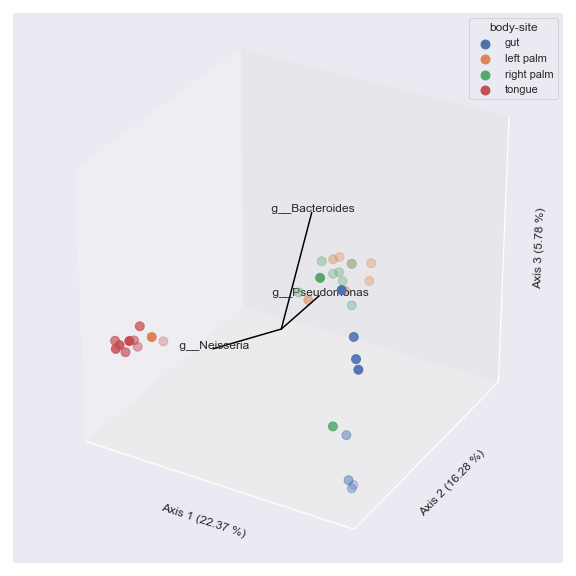
>
> ## barplot
>
> ```auto
> Help on function barplot in module dokdo.api:
>
> barplot(barplot_file, group, axis=0, figsize=(10, 10), level=1, count=0, items=None, by=None, label_columns=None, metadata=None, artist_kwargs=None, ylabel_fontsize=None, xaxis_repeated=False, cmap_name='Accent')
> This method creates a grouped abundance bar plot.
>
> Under the hood, this method essentially wraps the
> `taxa_abundance_bar_plot` method.
>
> Parameters
> ----------
> barplot_file : str or qiime2.Visualization
> Visualization file or object from the q2-taxa plugin.
> group : str
> Metadata column.
> axis : int, default : 0
> By default, charts will be stacked vertically. Use 1 for horizontal
> stacking.
> figsize : tuple, default: (10, 10)
> Width, height in inches. Format: (float, float).
> level : int, default: 1
> Taxonomic level at which the features should be collapsed.
> count : int, default: 0
> The number of taxa to display. When 0, display all.
> items : list, optional
> Specify the order of charts.
> by : list, optional
> Column name(s) to be used for sorting the samples. Using 'index' will
> sort the samples by their name, in addition to other column name(s)
> that may have been provided. If multiple items are provided, sorting
> will occur by the order of the items.
> label_columns : list, optional
> The column names to be used as the x-axis labels.
> metadata : str or qiime2.Metadata, optional
> Metadata file or object.
> artist_kwargs : dict, optional
> Keyword arguments passed down to the _artist() method.
> ylabel_fontsize : float or str, optional
> Sets the y-axis label font size.
> xaxis_repeated : bool, default: False
> If true, remove all x-axis tick labels except for the bottom subplot.
> Ignored if `axis=1`.
> cmap_name : str, default: 'Accent'
> Name of the colormap passed to `matplotlib.cm.get_cmap()`.
>
> See Also
> --------
> taxa_abundance_bar_plot
>
> ```
>
> Below is a simple example.
>
> ```auto
> barplot_file = 'data/moving-pictures-tutorial/taxa-bar-plots.qzv'
>
> dokdo.barplot(barplot_file, 'body-site', axis=1, figsize=(10, 6), level=6, count=8)
>
> plt.savefig('images/Dokdo-API/barplot-1-20201217.png')
>
> ```
>
> 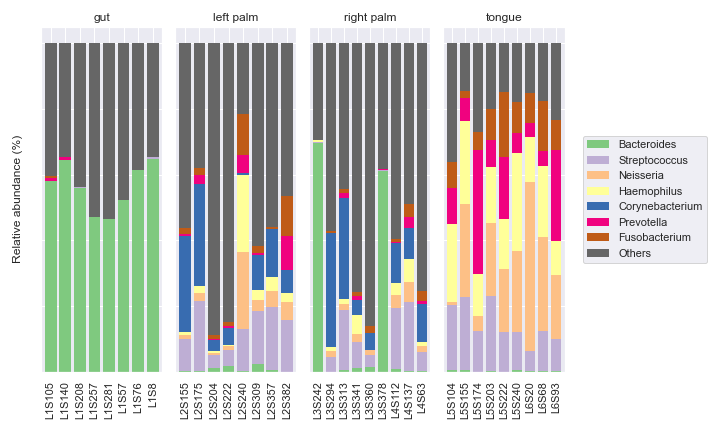
>
> We can draw the subplots vertically, which is particularly useful when the samples are matched.
>
> ```auto
> dokdo.barplot(barplot_file, 'body-site', axis=0, figsize=(8, 10), level=6, count=8, xaxis_repeated=True)
>
> plt.savefig('images/Dokdo-API/barplot-2-20201217.png')
>
> ```
>
> 
>
> ## heatmap
>
> ```auto
> Help on function heatmap in module dokdo.api:
>
> heatmap(table, metadata=None, hue=None, hue_order=None, normalize=True, method='average', metric='euclidean', figsize=(10, 10), row_cluster=True, col_cluster=True, cmap_name='tab10')
> This method creates a heatmap representation of a feature table.
>
> Parameters
> ----------
> table : str or qiime2.Artifact
> Artifact file or object corresponding to FeatureTable[Frequency].
> metadata : str or qiime2.Metadata, optional
> Metadata file or object.
> hue : str, optional
> Grouping variable that will produce labels with different colors.
> hue_order : list, optional
> Specify the order of categorical levels of the 'hue' semantic.
> normalize : bool, default: True
> Normalize the feature table by adding a psuedocount of 1 and then
> taking the log10 of the table.
> method : str, default: 'average'
> Linkage method to use for calculating clusters. See
> `scipy.cluster.hierarchy.linkage()` documentation for more information.
> metric : str, default: 'euclidean'
> Distance metric to use for the data. See
> `scipy.spatial.distance.pdist()` documentation for more options.
> figsize : tuple, default: (10, 10)
> Width, height in inches. Format: (float, float).
> row_cluster : bool, default: True
> If True, cluster the rows.
> col_cluster : bool, default: True
> If True, cluster the columns.
> cmap_name : str, default: 'tab10'
> Name of the colormap passed to `matplotlib.cm.get_cmap()`.
>
> Returns
> -------
> seaborn.matrix.ClusterGrid
> A ClusterGrid instance.
>
> ```
>
> Below is a simple example.
>
> ```auto
> table_file = 'data/moving-pictures-tutorial/table.qza'
>
> dokdo.heatmap(table_file)
>
> plt.savefig('images/Dokdo-API/heatmap-1-20210202.png')
>
> ```
>
> 
>
> We can color the samples by body-site.
>
> ```auto
> metadata_file = 'data/moving-pictures-tutorial/sample-metadata.tsv'
>
> dokdo.heatmap(table_file, metadata=metadata_file, hue='body-site')
>
> plt.savefig('images/Dokdo-API/heatmap-2-20210202.png')
>
> ```
>
> 
>
> ## regplot
>
> ```auto
> Help on function regplot in module dokdo.api:
>
> regplot(taxon, csv_file, subject, category, group1, group2, label=None, ax=None, figsize=None, artist_kwargs=None)
> Plot relative abundance data and a linear regression model fit from
> paired samples for the given taxon.
>
> Parameters
> ----------
> taxon : str
> Target taxon name.
> csv_file : str
> Path to the .csv file from the `taxa_abundance_box_plot` method.
> subject : str
> Column name to indicate pair information.
> category : str
> Column name to be studied.
> group1 : str
> First group in the category column.
> group2 : str
> Second group in the category column.
> label : str
> Label to use in a legend.
> ax : matplotlib.axes.Axes, optional
> Axes object to draw the plot onto, otherwise uses the current Axes.
> figsize : tuple, optional
> Width, height in inches. Format: (float, float).
> artist_kwargs : dict, optional
> Keyword arguments passed down to the _artist() method.
>
> Returns
> -------
> matplotlib.axes.Axes
> Axes object with the plot drawn onto it.
>
> See Also
> --------
> taxa_abundance_box_plot
>
> ```
>
> Below is a simple example where we pretend we only have the samples shown below. We are interested in comparing the relative abundance of Preteobacteria between the left palm and the right palm. We also want to perofrm the comparison in the context of days-since-experiment-start (i.e. paired comparison).
>
> ```auto
> from qiime2 import Metadata
>
> metadata = Metadata.load('data/moving-pictures-tutorial/sample-metadata.tsv')
> sample_names = ['L2S240', 'L3S242', 'L2S155', 'L4S63', 'L2S175', 'L3S313', 'L2S204', 'L4S112', 'L2S222', 'L4S137']
> metadata = metadata.filter_ids(sample_names)
> mf = dokdo.get_mf(metadata)
> mf
>
> ```
>
> | | barcode-sequence | body-site | year | month | day | subject | reported-antibiotic-usage | days-since-experiment-start |
> | --- | --- | --- | --- | --- | --- | --- | --- | --- |
> | sample-id | | | | | | | | |
> | --- | --- | --- | --- | --- | --- | --- | --- | --- |
> | L2S155 | ACGATGCGACCA | left palm | 2009.0 | 1.0 | 20.0 | subject-1 | No | 84.0 |
> | L2S175 | AGCTATCCACGA | left palm | 2009.0 | 2.0 | 17.0 | subject-1 | No | 112.0 |
> | L2S204 | ATGCAGCTCAGT | left palm | 2009.0 | 3.0 | 17.0 | subject-1 | No | 140.0 |
> | L2S222 | CACGTGACATGT | left palm | 2009.0 | 4.0 | 14.0 | subject-1 | No | 168.0 |
> | L3S242 | ACAGTTGCGCGA | right palm | 2008.0 | 10.0 | 28.0 | subject-1 | Yes | 0.0 |
> | L3S313 | AGTGTCACGGTG | right palm | 2009.0 | 2.0 | 17.0 | subject-1 | No | 112.0 |
> | L2S240 | CATATCGCAGTT | left palm | 2008.0 | 10.0 | 28.0 | subject-2 | Yes | 0.0 |
> | L4S63 | CTCGTGGAGTAG | right palm | 2009.0 | 1.0 | 20.0 | subject-2 | No | 84.0 |
> | L4S112 | GCGTTACACACA | right palm | 2009.0 | 3.0 | 17.0 | subject-2 | No | 140.0 |
> | L4S137 | GAACTGTATCTC | right palm | 2009.0 | 4.0 | 14.0 | subject-2 | No | 168.0 |
>
> Next, we will run the `taxa_abundance_box_plot()` method to create the input file for the `regplot()` method.
>
> ```auto
> qzv_file = 'data/moving-pictures-tutorial/taxa-bar-plots.qzv'
>
> dokdo.taxa_abundance_box_plot(qzv_file,
> level=2,
> hue='body-site',
> taxa_names=['k __Bacteria;p__ Proteobacteria'],
> show_others=False,
> figsize=(6, 6),
> sample_names=sample_names,
> add_datapoints=True,
> include_samples={'body-site': ['left palm', 'right palm']},
> csv_file='output/Dokdo-API/addpairs.csv',
> artist_kwargs=dict(show_legend=True, ymax=70))
>
> ```
>
> Finally, run the `regplot()` method.
>
> ```auto
> dokdo.regplot('k __Bacteria;p__ Proteobacteria',
> 'output/Dokdo-API/addpairs.csv',
> 'days-since-experiment-start',
> 'body-site',
> 'left palm',
> 'right palm')
>
> plt.tight_layout()
> plt.savefig('images/Dokdo-API/regplot-1-20210203.png')
>
> ```
>
> 
---
### Author:  [@timanix](https://forum.qiime2.org/u/timanix)
#### Post date: [November 9, 2020, 5:52am UTC](https://forum.qiime2.org/t/python-tutorial-data-visualization-with-dokdo-api/17380/2 "2020-11-09T05:52:11Z")
Hi! Thank you for an excellent tutorial!
It would be nice to have it earlier when I was redrawing a lot of figures from Qiime2 in Python and Jupyter lab 😆
Will save it for the future
---
### Author:  [@SoilRotifer](https://forum.qiime2.org/u/SoilRotifer)
#### Post date: [November 9, 2020, 4:34pm UTC](https://forum.qiime2.org/t/python-tutorial-data-visualization-with-dokdo-api/17380/3 "2020-11-09T16:34:06Z")
Hi @sbslee, this is really neat! 🖥
Thank you so much for sharing this with the :qiime2: community!
---
### Author:  [@sbslee](https://forum.qiime2.org/u/sbslee)
#### Post date: [November 23, 2020, 4:03am UTC](https://forum.qiime2.org/t/python-tutorial-data-visualization-with-dokdo-api/17380/4 "2020-11-23T04:03:22Z")
Hello! This is just to announce that a new version of Dokdo is available (1.1.0). The tutorial has been updated to reflect the changes as well. If you have any questions, please let me know.
---
### Author:  [@sbslee](https://forum.qiime2.org/u/sbslee)
#### Post date: [December 14, 2020, 12:16pm UTC](https://forum.qiime2.org/t/python-tutorial-data-visualization-with-dokdo-api/17380/5 "2020-12-14T12:16:41Z")
A new version of Dokdo (1.2.0) is available now! The tutorial has been updated accordingly. The biggest API change is that you can now control the font size for titles, labels, tick labels, legend, etc. See the `Title, Axis, Legend, Font Size` section for details.
---
### Author:  [@sbslee](https://forum.qiime2.org/u/sbslee)
#### Post date: [January 1, 2021, 2:36am UTC](https://forum.qiime2.org/t/python-tutorial-data-visualization-with-dokdo-api/17380/6 "2021-01-01T02:36:20Z")
Dokdo 1.3.0 is available now and the tutorial has been updated accordingly. From the [CHANGELOG.md](https://github.com/sbslee/dokdo/blob/master/CHANGELOG.md) file in Dokdo:
## 1.3.0
- Updated the `ordinate()` method so that the user can now choose to:
- skip rarefying,
- provide custom sampling depth for rarefying,
- provide `qiime2.Artifact` as input instead of file path, and
- output `PCoAResults % Properties('biplot')` as well as `PCoAResults` .
- Added new plotting methods:
- `beta_scree_plot()`
- `beta_parallel_plot()`
- `addbiplot()`
- `barplot()`
- See [#2](https://github.com/sbslee/dokdo/issues/1) for more details.
---
### Author:  [@sbslee](https://forum.qiime2.org/u/sbslee)
#### Post date: [January 25, 2021, 11:36am UTC](https://forum.qiime2.org/t/python-tutorial-data-visualization-with-dokdo-api/17380/7 "2021-01-25T11:36:11Z")
Dokdo 1.4.0 is available now and the tutorial has been updated accordingly. From the [CHANGELOG.md](https://github.com/sbslee/dokdo/blob/master/CHANGELOG.md) file in Dokdo:
## 1.4.0
- Added a new command called `summarize`.
- Added a new plotting method called `heatmap()`.
- Updated the following commands:
- `make_manifest`
- `add_metadata`
- `collapse`
- Updated the following methods:
- `_artist()`
- `alpha_rarefaction_plot()`
- `taxa_abundance_bar_plot()`
- `taxa_abundance_box_plot()`
- See [#4](https://github.com/sbslee/dokdo/issues/4) for more details.
---
### Author:  [@sbslee](https://forum.qiime2.org/u/sbslee)
#### Post date: [February 22, 2021, 12:39am UTC](https://forum.qiime2.org/t/python-tutorial-data-visualization-with-dokdo-api/17380/8 "2021-02-22T00:39:26Z")
Dokdo 1.5.0 is available now and the tutorial has been updated accordingly. From the [CHANGELOG.md](https://github.com/sbslee/dokdo/blob/master/CHANGELOG.md) file in Dokdo:
## 1.5.0
- Starting this version, Dokdo is packaged with `setuptools`.
- There have been major changes to the Dokdo CLI.
- Added a new plotting method called `regplot()`.
- Added a new command called `prepare-lefse`.
- The `merge_metadata` command has been deprecated.
- Updated the following methods:
- `_artist()`
- `alpha_diversity_plot()`
- `beta_3d_plot()`
- `beta_parallel_plot()`
- `barplot()`
- `ordinate()`
- `taxa_abundance_bar_plot()`
- `taxa_abundance_box_plot()`
- `heatmap()`
- Updated the `make_manifest` command.
- See [#6](https://github.com/sbslee/dokdo/issues/6) for more details.
---
### Author:  [@sbslee](https://forum.qiime2.org/u/sbslee)
#### Post date: [March 20, 2021, 1:00am UTC](https://forum.qiime2.org/t/python-tutorial-data-visualization-with-dokdo-api/17380/9 "2021-03-20T01:00:50Z")
Dokdo 1.6.0 is available now, but the tutorial will not be updated anymore for the reasons stated in the edited post above.
---
### Author:  [@sbslee](https://forum.qiime2.org/u/sbslee)
#### Post date: [April 17, 2021, 5:59am UTC](https://forum.qiime2.org/t/python-tutorial-data-visualization-with-dokdo-api/17380/10 "2021-04-17T05:59:13Z")
Dokdo 1.7.0 is available now, but the tutorial will not be updated anymore for the reasons stated in the edited post above.
---
### Author:  [@sbslee](https://forum.qiime2.org/u/sbslee)
#### Post date: [May 9, 2021, 5:39am UTC](https://forum.qiime2.org/t/python-tutorial-data-visualization-with-dokdo-api/17380/11 "2021-05-09T05:39:54Z")
Dokdo 1.8.0 is available now, but the tutorial will not be updated anymore for the reasons stated in the edited post above.
---
### Author:  [@sbslee](https://forum.qiime2.org/u/sbslee)
#### Post date: [June 7, 2021, 9:17am UTC](https://forum.qiime2.org/t/python-tutorial-data-visualization-with-dokdo-api/17380/12 "2021-06-07T09:17:28Z")
Dokdo 1.9.0 is available now, but the tutorial will not be updated anymore for the reasons stated in the edited post above.
---
### Author:  [@sbslee](https://forum.qiime2.org/u/sbslee)
#### Post date: [July 5, 2021, 11:55pm UTC](https://forum.qiime2.org/t/python-tutorial-data-visualization-with-dokdo-api/17380/13 "2021-07-05T23:55:42Z")
Dokdo 1.10.0 is available now, but the tutorial will not be updated anymore for the reasons stated in the edited post above.
---
### Author:  [@sbslee](https://forum.qiime2.org/u/sbslee)
#### Post date: [August 4, 2021, 11:42am UTC](https://forum.qiime2.org/t/python-tutorial-data-visualization-with-dokdo-api/17380/14 "2021-08-04T11:42:39Z")
Dokdo 1.11.0 is available now, but the tutorial will not be updated anymore for the reasons stated in the edited post above.
---
### Author:  [@milkymom](https://forum.qiime2.org/u/milkymom)
#### Post date: [August 20, 2021, 12:19pm UTC](https://forum.qiime2.org/t/python-tutorial-data-visualization-with-dokdo-api/17380/15 "2021-08-20T12:19:37Z")
Hi! Thank you very much for sharing this tutorial with our community 😀
---
### Author:  [@sbslee](https://forum.qiime2.org/u/sbslee)
#### Post date: [February 11, 2022, 4:50am UTC](https://forum.qiime2.org/t/python-tutorial-data-visualization-with-dokdo-api/17380/16 "2022-02-11T04:50:52Z")
Dokdo 1.12.0 is available now, but the tutorial will not be updated anymore for the reasons stated in the edited post above.
---
### Author:  [@sbslee](https://forum.qiime2.org/u/sbslee)
#### Post date: [April 2, 2022, 4:08am UTC](https://forum.qiime2.org/t/python-tutorial-data-visualization-with-dokdo-api/17380/17 "2022-04-02T04:08:52Z")
Dokdo 1.13.0 is available now, but the tutorial will not be updated anymore for the reasons stated in the edited post above.
---
### Author:  [@sbslee](https://forum.qiime2.org/u/sbslee)
#### Post date: [June 24, 2022, 3:43am UTC](https://forum.qiime2.org/t/python-tutorial-data-visualization-with-dokdo-api/17380/18 "2022-06-24T03:43:47Z")
Dokdo 1.14.0 is available now, but the tutorial will not be updated anymore for the reasons stated in the edited post above.
---
### Author:  [@Alxdu](https://forum.qiime2.org/u/Alxdu)
#### Post date: [July 14, 2022, 3:44pm UTC](https://forum.qiime2.org/t/python-tutorial-data-visualization-with-dokdo-api/17380/19 "2022-07-14T15:44:08Z")
Nice package. Has some very nice plotting features.
Is it still popular to plot rank abundance curves? That could be a nice addition. TY
---
### Author:  [@colinbrislawn](https://forum.qiime2.org/u/colinbrislawn)
#### Post date: [July 14, 2022, 4:59pm UTC](https://forum.qiime2.org/t/python-tutorial-data-visualization-with-dokdo-api/17380/20 "2022-07-14T16:59:09Z")
> [@Alxdu](#):
>
> Is it still popular to plot rank abundance curves?
It was in 2019
[](https://www.nature.com/articles/s41396-019-0396-x/figures/4)
[Next page](https://forum.qiime2.org/t/python-tutorial-data-visualization-with-dokdo-api/17380.md?page=2)