# Can anyone explain the interactive quality plots?
**URL:** https://forum.qiime2.org/t/can-anyone-explain-the-interactive-quality-plots/6959
**Category:** User Support
**Tags:** quality-filter
**Created:** [November 14, 2018, 6:46am UTC](https://forum.qiime2.org/t/can-anyone-explain-the-interactive-quality-plots/6959 "2018-11-14T06:46:25Z")
**Posts on this page:** 6
**Page:** 1
### Author:  [@khaknasheen](https://forum.qiime2.org/u/khaknasheen)
#### Post date: [November 14, 2018, 6:46am UTC](https://forum.qiime2.org/t/can-anyone-explain-the-interactive-quality-plots/6959/1 "2018-11-14T06:46:26Z")
Dear Researcher,
After reading the tutorial, I imported my data to Qiime 2 pipeline following the workflow given in the tutorial. The analysis was smooth however I reached a step, where I could not move forward. I put the **Qiime demux summary** command and got **"demux.qzv"** file. I uploaded the file into Qiime 2 view and got **two interactive plots** for the forward and reverse reads. I use the mouse cursor to zoom out and zoom in and saw a world of small whisker box plots. On Y axis, there is a quality score and the colour of whisker box blots is black in the middle while the upper and lower portion are dashed lines and on the x-axis, there were about 300 sequence bases. Offcourse next step is \*\*
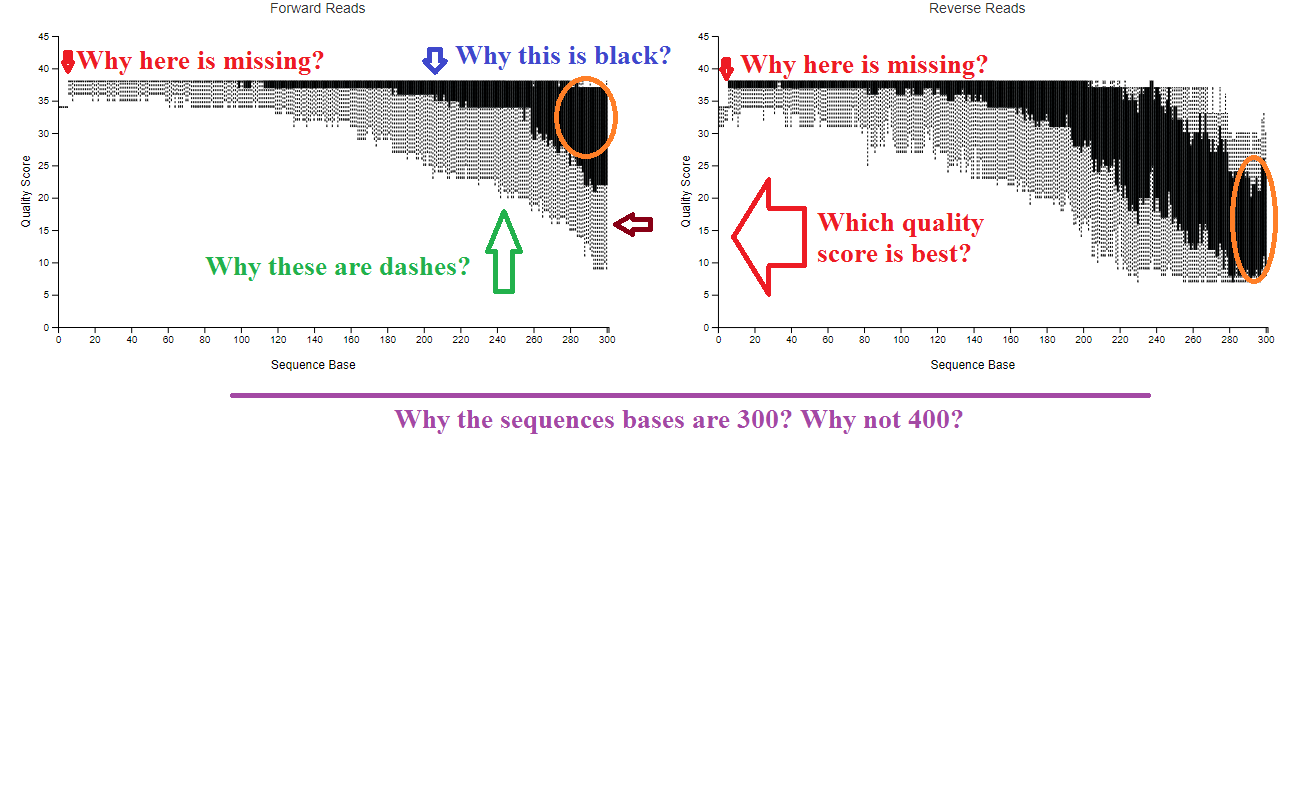 \*\* but before I need to put a command to trim the left and right side of my forward and reverse reads. Which value I should use to trim length and trim right. If I choose 280 left and 0 right, the question is why? I am attaching the quality plots with some colourful questions? Please find and suggest trimming length as well as give me reasons why are you suggesting that trimming length.
Thank You!
---
### Author:  [@thermokarst](https://forum.qiime2.org/u/thermokarst)
#### Post date: [November 14, 2018, 2:44pm UTC](https://forum.qiime2.org/t/can-anyone-explain-the-interactive-quality-plots/6959/2 "2018-11-14T14:44:47Z")
---
### Author:  [@bsen2018](https://forum.qiime2.org/u/bsen2018)
#### Post date: [November 15, 2018, 3:01am UTC](https://forum.qiime2.org/t/can-anyone-explain-the-interactive-quality-plots/6959/4 "2018-11-15T03:01:47Z")
Hi @Khaknasheen
An useful and related thread to read to resolve your questions on q2-demux summary:
> [@Trim based on quality score not the sequence position](https://forum.qiime2.org/t/trim-based-on-quality-score-not-the-sequence-position/6830):
>
> Hi, I have a question about quality check and trimming in qiime2. I usually trimmed my sequences based on the primer sequence and the quality score below 20 using trimmoatic. However, the way trimming works with qiime 2 is that we should trim based on the sample position where the quality drops. However, my quality drops at 236 position and goes up again at 245. Is there anyway that I can trim at a specific quality instead of a position? Also, for trimming the primer, should I use --p-trim-le…
Good luck!
---
### Author:  [@khaknasheen](https://forum.qiime2.org/u/khaknasheen)
#### Post date: [November 15, 2018, 2:38am UTC](https://forum.qiime2.org/t/can-anyone-explain-the-interactive-quality-plots/6959/5 "2018-11-15T02:38:05Z")
(post withdrawn by author, will be automatically deleted in 24 hours unless flagged)
---
### Author:  [@thermokarst](https://forum.qiime2.org/u/thermokarst)
#### Post date: [November 15, 2018, 4:10am UTC](https://forum.qiime2.org/t/can-anyone-explain-the-interactive-quality-plots/6959/6 "2018-11-15T04:10:21Z")
---
### Author:  [@system](https://forum.qiime2.org/u/system)
#### Post date: [December 16, 2018, 2:32pm UTC](https://forum.qiime2.org/t/can-anyone-explain-the-interactive-quality-plots/6959/10 "2018-12-16T14:32:36Z")
This topic was automatically closed 31 days after the last reply. New replies are no longer allowed.