# Automating qiime2 commands with bash script
**URL:** https://forum.qiime2.org/t/automating-qiime2-commands-with-bash-script/22153
**Category:** General Discussion
**Created:** [February 11, 2022, 8:19pm UTC](https://forum.qiime2.org/t/automating-qiime2-commands-with-bash-script/22153 "2022-02-11T20:19:36Z")
**Posts on this page:** 7
**Page:** 1
### Author:  [@Sam\_Degregori](https://forum.qiime2.org/u/Sam_Degregori)
#### Post date: [February 11, 2022, 8:19pm UTC](https://forum.qiime2.org/t/automating-qiime2-commands-with-bash-script/22153/1 "2022-02-11T20:19:36Z")
Hi all,
I find myself constantly filtering different datasets and then running the same commands on them where first I filter by metadata, then I run the core metrics command on that subset, and then a couple of beta and alpha diversity tests on all the distance matrix outputs for that subset.
I feel like someone has had to have written a script to automate this? Anyone know of any posts touching on this? Could not find much.
Edit: just to be more clear something like code below:
qiime feature-table filter-samples
--i-table cleantable.qza
--m-metadata-file compiled\_island\_metadata.txt
--p-where "[Column]= **'$var1'"**
--o-filtered-table **[$var1**]table.qza
> qiime diversity core-metrics-phylogenetic
> --i-phylogeny rooted-treei3.qza
> --i-table [**$var1**]table.qza
> --p-sampling-depth 1000
> --m-metadata-file compiled\_island\_metadata.txt
> --output-dir core-metrics-results-barber-[**$var1**]
and so on. where var1 is basically the treatment and I want to use it as a naming mechanism for all downstream processes. Not sure how to insert var1 into the bash script so I just used brackets as a guess.
Thank you!
Cheers,
Sam
---
### Author:  [@colinbrislawn](https://forum.qiime2.org/u/colinbrislawn)
#### Post date: [February 11, 2022, 11:58pm UTC](https://forum.qiime2.org/t/automating-qiime2-commands-with-bash-script/22153/2 "2022-02-11T23:58:26Z")
Hello Sam,
Yep, some have been built. These two use Snakemake: 🐍
> [@Tourmaline: a workflow for rapid and reproducible amplicon sequence analysis using QIIME 2 and Snakemake](https://forum.qiime2.org/t/tourmaline-a-workflow-for-rapid-and-reproducible-amplicon-sequence-analysis-using-qiime-2-and-snakemake/20817):
>
> Announcing [Tourmaline](https://github.com/aomlomics/tourmaline), a fully-featured Snakemake workflow for QIIME 2. Features include: Portability. Native support for Linux and macOS in addition to Docker containers. QIIME 2. The core commands of Tourmaline, including the [DADA2](https://benjjneb.github.io/dada2/index.html) and [Deblur](https://github.com/biocore/deblur) packages, are all commands of QIIME 2, one of the most popular amplicon sequence analysis software tools available. You can print all of the QIIME 2 and other shell commands of your workflow before or while running the workflow. Snakemake. Managing the…
> [@QIIME2 snakemake workflow tutorial - 18S/16S tag-sequencing](https://forum.qiime2.org/t/qiime2-snakemake-workflow-tutorial-18s-16s-tag-sequencing/11334):
>
> Tutorial: Run qiime2 for 18S or 16S tag-sequencing using snakemake Sarah Hu Summary: This tutorial was written with qiime2-2019.4 for 18S tag-sequencing (but can be adopted for any metabarcoding. Below tutorial uses an 18S dataset to go from raw fastq files to a complete ASV tutorial. I will continue to update this tutorial and add to it on the GitHub repos listed below. Tag-sequencing pipeline to generate ASVs - [https://github.com/shu251/tagseq-qiime2-snakemake](https://github.com/shu251/tagseq-qiime2-snakemake) - input raw fastq sequences,…
You could also capture your common commands in a code notebook like [Jupyter](https://jupyter.org/), then simply make a new copy of your notebook for each project, then modify and rerun as needed.
---
### Author:  [@Sam\_Degregori](https://forum.qiime2.org/u/Sam_Degregori)
#### Post date: [February 12, 2022, 12:13am UTC](https://forum.qiime2.org/t/automating-qiime2-commands-with-bash-script/22153/3 "2022-02-12T00:13:12Z")
Hi Colin,
Thanks for sharing. Snakemake sounds very useful. Will take a look.
Also I messed around on bash and made this script so I don't have to go back and change the metadata columns etc. So now I can just run :
> bash auto.sh column var1
for a given treatment where auto.sh is something like:
> #!/bin/bash
> #automation script
>
> column=$1
> var1=$2
> table=table.qza
>
> qiime feature-table filter-samples
> --i-table cleantable.qza
> --m-metadata-file compiled\_island\_metadata.txt
> --p-where "[$column]='$var1'"
> --o-filtered-table $var1$table
>
> qiime diversity core-metrics-phylogenetic
> --i-phylogeny rooted-treei3.qza
> --i-table $var1$table
> --p-sampling-depth 1000
> --m-metadata-file compiled\_island\_metadata.txt
> --output-dir core-metrics-results-barber-$var1
But you can keep going with all the analyses
---
### Author:  [@colinbrislawn](https://forum.qiime2.org/u/colinbrislawn)
#### Post date: [February 12, 2022, 7:44pm UTC](https://forum.qiime2.org/t/automating-qiime2-commands-with-bash-script/22153/4 "2022-02-12T19:44:46Z")
Nice! 👍
If you want to get started using Snakemake, I highly recommend it. It has a wonderful learning curve, making it easy to automate easy tasks, then slowly adds complexity to automake complex tasks.
There's the excellent [snakemake tutorial](https://snakemake.readthedocs.io/en/stable/tutorial/short.html), and this 5-step Qiime2 [pipeline](https://github.com/colinbrislawn/unite-train/blob/main/workflow/Snakefile) I made that trains a sklearn classifier
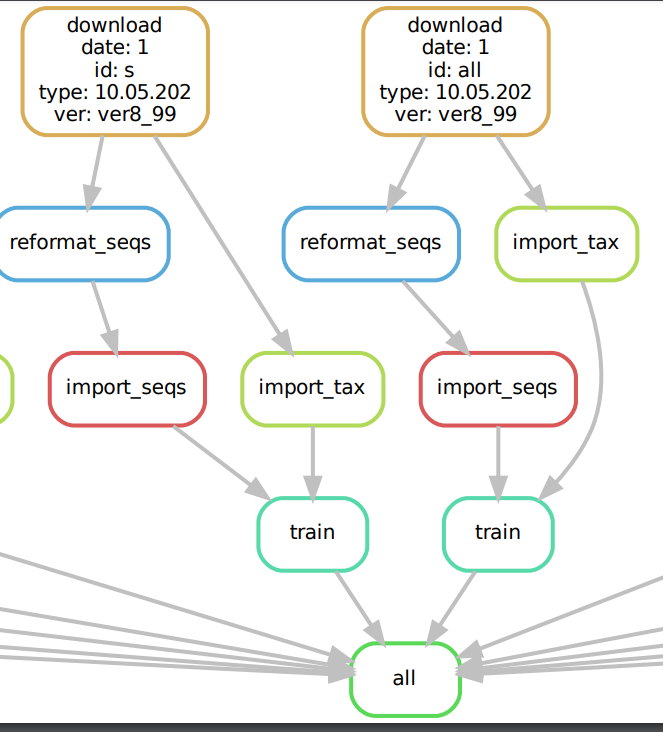
EDIT: One of the best parts about Snakemake + Qiime2 is that you can build fully automated pipelines AND you still have the detailed provenance baked into each Qiime2 artifact produced. So even as you distribute results or proceed with downstream analysis outside of your Snakemake pipeline, the full provenance is preserved. 📝 ⌛ ⏪
---
### Author:  [@Sam\_Degregori](https://forum.qiime2.org/u/Sam_Degregori)
#### Post date: [February 14, 2022, 5:12pm UTC](https://forum.qiime2.org/t/automating-qiime2-commands-with-bash-script/22153/5 "2022-02-14T17:12:41Z")
Yea this would help me expand this to my entire pipeline for big datasets. Thank you!
---
### Author:  [@DaS](https://forum.qiime2.org/u/DaS)
#### Post date: [February 16, 2022, 9:22am UTC](https://forum.qiime2.org/t/automating-qiime2-commands-with-bash-script/22153/6 "2022-02-16T09:22:14Z")
To add an alternative implementation: I maintain a nextflow pipeline for amplicon sequencing analysis: [ampliseq: Introduction](https://nf-co.re/ampliseq) & [GitHub - nf-core/ampliseq: Amplicon sequencing analysis workflow using DADA2 and QIIME2](https://github.com/nf-core/ampliseq). I made a more detailed post [here](https://forum.qiime2.org/t/nf-core-ampliseq-a-versatile-comprehensive-and-reproducible-amplicon-sequencing-analysis-pipeline/22019).
---
### Author:  [@Sam\_Degregori](https://forum.qiime2.org/u/Sam_Degregori)
#### Post date: [February 17, 2022, 7:53pm UTC](https://forum.qiime2.org/t/automating-qiime2-commands-with-bash-script/22153/8 "2022-02-17T19:53:05Z")
Awesome this is great. THank you!